For digital marketing, knowing how visitors find your site is crucial to getting the most desired results. A UTM link allows you to see precisely where your audience comes from, which of your campaigns drove the most engagement, and which of your channels converts the best.
Every marketer runs campaigns across multiple platforms such as social media, email, paid advertising, and influencers. However, without the attribution of tracking, it would be nearly impossible to analyze which method worked best. That’s when UTM tracking comes into play.
A UTM link (Urchin Tracking Module link) is one of the most effective ways to measure performance across your marketing strategies. From the steps outlined in this blog, you will be able to learn how to create UTM links for your campaigns and integrate Google Analytics to track UTM parameters to accurately measure success and adjust strategies towards data-driven decisions.
What Is a UTM Link and How It Works
UTM stands for Urchin Tracking Module - which comes from Urchin Software, a web analytics tool bought by Google to build the not-so-distant ancestor of Google Analytics.
A UTM link is simply your website URL along with some tracking parameters at the end. These extra bits of data show you where your traffic is coming from. Many marketers also combine UTMs with smart short links to improve tracking and click-through rates.
- Standard URL: https://examplewebsite.com/product-page
- UTM Link: https://examplewebsite.com/product-page?utm_source=facebook&utm_medium=social&utm_campaign=winter_promo
A UTM link follows this structure:
- Base URL: This is your main URL (e.g., https://examplewebsite.com/product-page)
- Query starter (?): This signals the beginning of your UTM tracking tags
- UTM parameters: These are the data tags utm_source, utm_medium, and utm_campaign
- Parameter separators (&): These are used to separate multiple parameters
- Values: The identifiers that tell you where the traffic originated (e.g., facebook, social, winter_promo)
Each parameter in a UTM link gives you a specific piece of insight:
- utm_source indicates the origin (platform or publisher) of the visitor.
- utm_medium describes the type of channel (e.g., email, social, or some form of paid).
- utm_campaign indicates the marketing campaign associated with the link.
By utilizing these values, you will have a detailed and data-driven view of how people discover your brand and how campaigns perform against each other. This makes it easier to run agile marketing campaigns using editable tracking links.
Key Components of a UTM Link
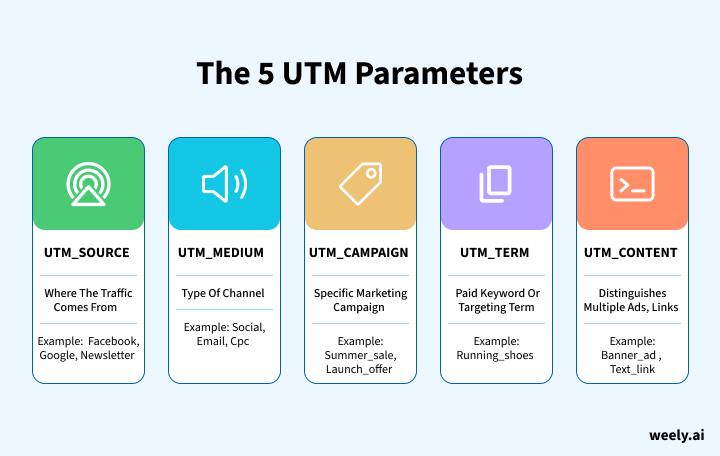
A UTM link is made up of five core parameters. Three parameters are considered required parameters, whereas another two are optional but still valuable in tracking and measurement. Many marketers also combine UTMs with short links with analytics to track engagement more easily.
utm_source
The utm_source parameter designates where your traffic came from. Simply put, which platform, site, or service referred traffic to your site.
Examples:
- utm_source=google → traffic from Google Search or Ads
- utm_source =facebook → traffic from Facebook campaigns
- utm_source=newsletter → traffic from email newsletter campaigns
Once you identify where traffic is sourced, you can then view the quality of that traffic and make comparisons between sources - for instance, if Google Ads traffic converts better than Facebook traffic, you now know where to allocate more budget on spending. Advanced link management tools help organize campaign sources and track link performance.
utm_medium
The utm_medium parameter tells you how your traffic got to your site. When speaking to traffic, the utm_medium describes the marketing medium that was employed to deliver the message to your traffic.
Examples:
- utm_medium=email → traffic from newsletters or email automation
- utm_medium=cpc → traffic from paid search campaigns
- utm_medium=social → traffic from organic social media posts
- utm_medium=referral → traffic from links on other websites
Tracking UTM mediums allows you the potential to analyze which marketing channels are weak, which are strong, and which channels to put more budget into - whether that is organic, paid ads, or referral traffic. Understanding online vs offline marketing statistics can also help determine which channels deserve more budget.
utm_campaign
The utm_campaign parameter identifies the campaign to which the link is related. It allows all marketing activities related to one promotion to be grouped under the same label.
Examples:
- utm_campaign=spring_sale
- utm_campaign=product_launch
- utm_campaign=webinar_march
This is particularly useful in analytics for measuring ROI per campaign. You know at a glance which promotions generated the most conversions and revenue.
utm_term
The utm_term parameter is used with paid search campaigns (i.e., Google Ads). It identifies which keyword or targeting term triggered your ad.
Examples:
- utm_term=running_shoes
- utm_term=discount_coupons
Your UTM terms can be referenced to improve ad targeting, pause underperforming keywords and focus on high-converting keywords.
utm_content
The utm_content parameter differentiates between multiple links or creatives in the same campaign. It's useful to differentiate or A/B test your links to determine what creative or ad works best.
Examples:
- utm_content=header_banner → banner image at the top of a page
- utm_content=text_link → a link that is in the text of a blog
- utm_content=button_blue → reference to a blue CTA button
This parameter assists marketers in determining what type of content, design, or CTA drove the most engagement.
How to Create a UTM Link
UTM link builder is straightforward and can be done either manually or instantly from a tool such as Weely. A UTM link provides information on where your traffic is coming from and optimizes your UTM tracking towards campaigns to provide a clear understanding of what is effective in your marketing efforts.
Steps to Create a UTM Link
1. Start with your website URL
This is the page you are going to be sending traffic to.
Example: https://yourwebsite.com/
2. Add a question mark (?)
This lets the reader know that tracking parameters are coming.
Example: https://yourwebsite.com/?
3. Add the main UTM parameters
The three fields needed for how to properly create UTM links are:
- Source (utm_source): Where your traffic is coming from. Example: google, facebook, newsletter
- Medium (utm_medium): The type of marketing channel. Example: social, email, cpc
- Campaign (utm_campaign): The campaign name. Example: winter_sale, product_launch
Now your UTM link looks like this:
https://yourwebsite.com/?utm_source=facebook&utm_medium=social&utm_campaign=winter_sale
4. Add optional parameters (if needed)
1. Term (utm_term):
Good for searching terms when you work on paid campaigns
Example: digital_marketing_course*
2. Content (utm_content):
To help compare ad or link versions
Example: banner_ad, text_button
Example of optional fields included:
https://yourwebsite.com/?utm_source=facebook&utm_medium=social&utm_campaign=winter_sale&utm_content=banner_ad
5. Copy your UTM link and use it in your campaigns
You can use your final link on:
- Social Media Posts
- Email newsletters
- Paid ads
- SMS campaigns
- Influencer or partner promotions
You can track every click now.
6. (Optional) Build your UTM link faster with Weely
You can also generate a UTM link quickly with Weely’s UTM Builder if you don’t want to create one yourself.
Enter your URL and campaign information, and Weely will create a clean UTM link for you.
7. (Optional) Shorten the link
If your UTM link is long, use any link shortener - the tracking will work the same as it will with a longer tracking link.
How to Track Campaign Performance
Every time someone clicks on your links, that's when the real information starts flowing - this is called monitoring. The best way to monitor your links is through Google Analytics.
Tracking in Google Analytics 4 (GA4)
- Log into Google Analytics 4.
- Visit Reports → Acquisition → Traffic Acquisition.
- Filter by Source, Medium, or Campaign.
- Look for important engagement metrics such as sessions, bounce rate, and conversions as a result of the campaigns.
- See which channels or campaigns lead to better outcomes.
Once you learn how to track UTM parameters in Google Analytics, you can quickly find what is working - and where you need to optimize.
You could also use GA4 in conjunction with another Google product, Looker Studio (formerly known as Data Studio), to view all the UTM link data altogether in one visual dashboard.
Best Practices for Using UTM Links
When you use UTM linking with consistency, you will keep your UTM tracking clean, enhance your reporting, and gain insights into which campaigns drive results. By using the same basic rules every time you create a UTM link, your team will be able to easily gain better insights and track campaigns in a more solid way across all channels. Some marketers also use vanity URLs along with UTMs to make campaign links that are unique and easy to remember.
Naming & Consistency (Best Practices)
Using a structured and repeatable naming convention will ensure that every time you create UTM links, your data analysis remains clean and understandable. A consistent naming system will also help eliminate any unwanted splitting or inaccuracies due to similar values being tracked differently by the data source.
- Establish a naming convention: Have a clear, standard format that can be utilized by any campaign.
- Use lowercase letters: Keep from splitting values tracked in your analytics.
- Avoid spaces: Be sure to use hyphens or underscores to keep your URLs clean and readable.
- Be descriptive yet concise: Provide enough description to identify the link, but if it is too long, it becomes hard to use.
- Avoid repetition: Make sure you are using a parameter for one thing only to keep things clear.
Implementation & Tracking
After you’ve determined your naming convention, implementing UTMs correctly helps to verify UTM tracking will remain accurate. Monitoring performance and testing each UTM link ensures accurate measurement over time.
- Use UTMs only on external links: Avoid tagging internal URLs to keep analytics clean.
- Track links in a spreadsheet: Keep all of the UTM parameters in one location for the team.
- Test each UTM link: Confirm that the URL loads properly and the parameters are appropriately saved.
- Use shorteners carefully: Make sure that the URL actually loads and passes through all parameters it has so that data is properly logged for analytics tracking.
- Review your data regularly: Review campaign tracking data to create opportunities for adjustments and enhance the performance of future campaigns.
Conclusion: Why UTM Links Are Essential for Accurate Campaign Tracking
UTM links are among the easiest but most useful tools to learn how you're performing with your marketing efforts. When used correctly, a UTM link can show you where your traffic is coming from, which campaigns deliver value, and how users interact with channels and one another. If you are consistent with naming conventions, test your links, and look at your analytics reports consistently, you'll quickly develop skill in tracking behaviors and optimizing your strategy through the data you've accumulated, along with your experience in the process. Using branded short links in ads can help build trust and get more people to click through.
In any campaign you manage, whether it's social media, email, paid ads, or partnerships, a good campaign tracking process will ensure that any and all dollars you spend towards marketing are being tracked and analyzed. Start using UTMs across platforms, be consistent, and use your experience to drive continuous improvement and growth.
FAQs About UTM Links and Campaign Tracking
What is a UTM link and why is it important for campaign tracking?
A UTM link is a URL that has tracking parameters added to it to aid in identifying where your traffic is coming from. UTM links are useful for accurately tracking a campaign or campaign channel as they will tell you which website, ad, email, or social media post is being clicked on and ultimately converts traffic.
How do I create a UTM link for my marketing campaigns?
UTM links include tracking fields such as utm_source, utm_medium, and utm_campaign, which you attach to your URL to monitor where your traffic originates and how each campaign performs.
What is the best way to use UTM parameters for social media tracking?
For social media UTM tracking, it is best practice to use consistent naming, limit spacing, and always keep the source clear (i.e., facebook, instagram, linkedin) as it makes for better reporting and feature for your platform performance.
Which UTM parameters are required and which are optional?
Required parameters: utm_source, utm_medium, utm_campaign.
Optional parameters: utm_term and utm_content. These will provide performance data for a deeper level of insight into long-tail campaigns, split testing, or even tracking keywords.
How can I track UTM link performance in Google Analytics?
You can track UTM link performance in Google Analytics by going to Google Analytics→Reports→Acquisition→Traffic Acquisition. Once on this page, you can filter UTM links by source, medium, or campaign to view the results.
Do UTM links help with SEO or ranking?
UTM links do not impact search engine rankings; however, they allow you to understand which marketing channels are increasing traffic, user, and ultimately can lead to conversions. This information indirectly allows you to make better optimization decisions.
Should I use UTM links on internal website pages?
No. If you instrument UTM parameters on internal pages, you can break your analytics, and also misattribute your sessions. You should only utilize UTM parameters for external campaign tracking - i.e., social media channels, emails, ads, and third-party partner websites.
How long should my UTM link names be?
You should use short, descriptive names and keep UTM names consistent. Even long UTM names can quickly become messy and harder to track. If your UTM links are presenting long-tail keywords to add clarity, then that is fine. Otherwise, good practice is to avoid excessive wording.
What are the best practices for UTM tracking in multi-channel campaigns?
Use consistent naming, take notes on every UTM link you generate, test each one before you launch, avoid duplicate UTMs, and regularly check your multi-channel UTM tracking report to make improvements.