QR codes have become a part of everyday whether it's payments, audio menus, apps, logins, or quick access to info. With all the use of them, risks are also heightened. Verifying safety using a QR code scanner and having peace of mind is very important, especially as fake or malicious QR codes are created intending to collect personal information or take you to an unsafe site.
Because of their simplicity and trustworthy nature, cyber criminals can easily build these links into QR codes. People scan QR codes without thinking twice. Therefore, how to identify a secure QR code has become an important part of online safety.
Using tools like Weely, a site where you can scan a QR code online before going to the link, could provide a safer verification process to trust the QR code's information without going to the link right away. This could be a QR code at a restaurant, store, or public display. Verifying the safety of the QR code with QR code scanner can also protect your device and personal information.
Understanding QR Code Safety: What Makes a QR Code Risky?
QR codes aren't inherently hazardous; it's what lies within that's dangerous. Because QR codes can only be understood through scanning with a QR code scanner, malicious actors build harmful links, phishing websites, or untrustworthy files or applications. This gives attackers a break because it's so easy to deceive users into scanning and avoiding verification with the secure QR scanner.
The greatest threat of using QR codes is how easily cybercriminals populate public spaces with dangerous QR codes. Cybercriminals can literally place a sticker with a fake QR code on top of a real QR code on a flyer, pamphlet, coupon, restaurant menu, parking meter, or delivery bag, connecting you with risky websites intended to harvest your private information.
Common QR Code Risks Include:
- Phishing links that appear to be legitimate and that ask you to enter credentials, bank account information, or PII (protected identifiable information).
- Malicious payloads are masked as an intended file or application, one that will install malware on your smartphone or harvest existing stored data.
- Unsafe redirect to a website that appears legitimate but is indeed controlled by a cyber criminal.
- Encrypted or masked URL intended to conceal your destination.
- QR codes that automatically take an action, like sending a text message, adding a contact, or making a payment.
- Maintaining fake QR code stickers often displayed in public locations, like posters or flyers that replace the original QR code.
These risks emphasize the importance of knowing QR code safety, and how to spot unsafe codes. The more familiar you are with common attack methods, the more likely you will avoid scanning unsafe codes.
How to Identify a Secure QR Code Before Scanning
Before you scan any QR code, you should take a moment to check if it looks trustworthy with a free QR code scanner. Since QR codes conceal the link they will take you to, malicious actors rely on the fact that people will scan the code without thinking. By knowing what to look for, you can circumvent a lot of common attacks and make your QR code experience safer.
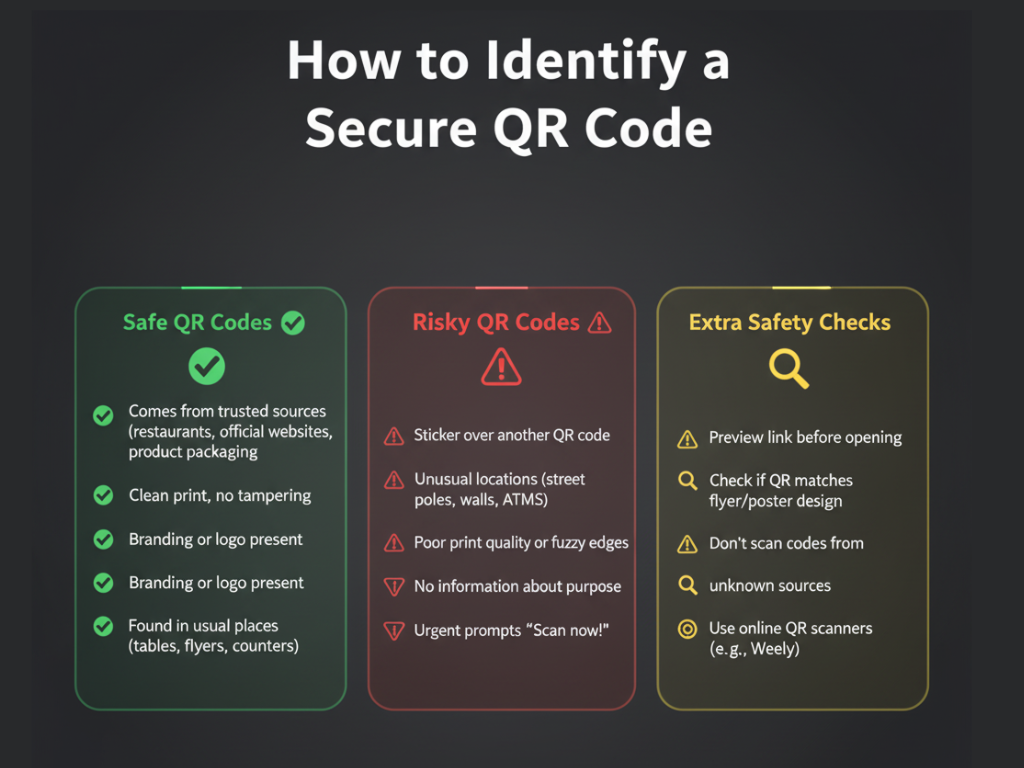
Signs of a Secure QR Code
A QR code is more likely to be secure if:
- The code comes from a trusted source (a restaurant, official website, verified business, or product packaging).
- The QR code is not printed cleanly and has no signs of tampering.
- There is branding or a logo on the QR code. Branding and logos make it difficult for malicious individuals to replace QR codes.
- The QR code is in a place a business typically provides QR codes (tables, counters, flyers).
Signs a QR Code Might Not Be Secure
Be cautious if you notice:
- A sticker that has been placed over another QR code (this is common in deceptive schemes in public).
- A QR code is located in an unusual place (like street poles, walls, or ATMs).
- The QR code is printed poorly, has fuzzy edges, or has any sign of poor design.
- There isn't information around the QR code that explains what it is (for example, a brand name, instructions, or purpose).
- The QR code prompts you to scan it quickly ("scan it now!") - A classic deceptive tactic.
Additional Checks to Ensure the QR Code Is Secure
- Check to see what the QR code is taking you to, the website or company brand it is supposed to represent.
- If you encounter the QR code while scrolling through a posted flyer or poster, see if it looks like a part of the flyer or poster design.
- Do not scan a QR code that you have received from someone you do not know or received randomly in a public space.
- Use, for example, Weely, an online QR code scanner tool, to examine the QR code content, which will allow you to determine if it is safe or not safe to open the link.
After these few seconds of checking these procedures, you change your odds of not ending on a malicious page. Just a few easy habits go a long way in determining a secure QR code.
Common QR Code Threats You Should Watch Out For
QR code frauds are increasingly becoming more popular as malicious actors continue to find more ways to trick and deceive you into scanning unsafe QR codes. These fraudulent activities tend to look normal and harmless, which contributes to how easy it is to fall for them. Below, you will discover the most common and most dangerous QR code frauds that you need to familiarize yourself with in order to be safer with QR codes and prevent yourself from scanning unsafe QR codes.
1. Payment Redirection Fraud
These fraudulent activities are designed with the intention of targeting the places where people make quick mobile payments. Cybercriminals replace the original QR code with a fake one, which directs your payment to their account without you even realizing it.
How this fraud works:
- The malicious actor replaces the authentic QR code with a fraudulent code.
- Your payment will be redirected to the attacker instead of the business when the QR code is scanned.
- Common targets: Parking meters, donation posters, cafes, small shops
2. Fake Login Pages (Phishing QR Codes)
This fraud tactic tricks individuals into inputting their credentials onto a page that appears legitimate. The QR code redirects you to a fake login webpage that is made to gather any personal information.
How this fraud works:
- Leads you to a phishing login page through a QR code.
- You enter your username or password → malicious actor steal your credentials for the account.
- Often used for: Email accounts, social media logins, and banking apps.
3. Delivery & Package QR Code Fraud
Malicious individuals can place counterfeit QR codes on packages or the delivery slip itself. They often cause a sense of urgency, which tries to trick you into scanning.
How this fraud works:
- The counterfeit QR code could be on a package or on the slip indicating delivery.
- It will redirect you to a site requesting personal or payment information.
- It can, most commonly, act as an impostor for larger delivery services.
4. Restaurant Menu Fraud
Restaurants often use a digital menu, allowing fraudsters to replace the restaurant's legitimate QR code, leading to harmful QR codes. This relates to the guests' immediate reaction to scanning a menu.
How this fraud works:
- A fraudster will place a fake QR code over and directly next to a restaurant's real menu QR code.
- The fake code would take you to phishing or malware instead of the menu.
- This is one of the growing QR codes frauds quickly.
5. Public Poster & Advertisement Fraud
The final fraudulent with QR codes that usually consist of fraudulent posters or advertisements will take advantage of pedestrians in heavily populated public spaces. It is getting high traffic to achieve a quick scan.
How this fraud works:
- Adding fake QR codes to posters in malls, bus stops, gyms, etc.
- Claiming discounts, offers, and prizes.
- Instead, they redirect you to unsafe websites or steal your data.
6. App Download Fraud
In these fraud, users are misled into downloading a fake app from a QR code. The application may look real, but it is actually a method of either malware or spyware.
How this fraud works:
- The QR code takes you to a fake download of the app.
- The app contains, at the very least, malware, spyware, or a keylogger.
- Malware gained access to personal data or device settings.
QR Code Secure Scanning: Best Practices for Safe Usage
While scanning QR codes is convenient, using some common sense can help reduce the risks of landing on a malicious website or being defrauded. When your practice secure QR code scanning, you are safeguarding your device, personal information, and account safety. These best practices will not take time to implement and will make a substantial difference in the overall safety of scanning QR codes.
Best Practices for Secure QR Code Scanning
- Preview the link before accessing it with a safe QR scan. The majority of safety QR scanners show the URL you will be visiting first. Try to avoid QR scan apps that take you directly to a website.
- Check the source of the QR code. Only scan codes you know from legitimate businesses and brands that are well-known, official accounts, or legitimate businesses.
- Avoid scanning QR codes that are randomly in public. Generally, avoid scanning codes you find on buildings, street lamp posts, or bathroom signs. These are common places that malicious individuals place QR codes to deceive you.
- Look for any signs of tampering. If a QR code appears to be a sticker placed over another QR code, do not scan it.
- Use a secure QR scanner, like Weely. Being able to ensure that the code is secure, or not secure, before opening any link is important.
- Disable auto-permissions. Turn off settings that supply QR codes with the ability to open apps, download files, or automatically make changes.
- Never scan a QR code over public Wi-Fi. Public networks have a higher chance of data interception.
- Ensure your phone is updated. Security updates are crucial for protecting your device from a malware attack through a flawed link.
Following the above steps provides a much safer QR code experience for those who wish to not fall victim to malicious QR codes.
Weely: A Simple & Secure Way to Scan QR Codes Online
Safety concerns arise when scanning QR codes because you never know where a QR code will take you until after it is scanned. Weely helps make this process safer by allowing you to check any QR code online with QR code scanner that is free. With Weely, you will quickly know whether the QR code opens a Safe URL or Potentially Unsafe Link before you click on it, meaning you have the power and control to decide what you click on.
Weely delivers just in time for users in daily life, shoppers, students, and businesses looking to assess QR codes quickly. Whether a QR code is printed in a menu, package, poster, or label of a product sitting on a shelf, Weely will tell you what is underneath the free QR code scanner, so you do not have to take the chance of landing on a malicious site.
What You Can Do with Weely
- Scan QR codes online in just seconds.
- Scan directly with your device’s camera.
- Upload any QR code image or screenshot.
- Preview the actual URL or text before opening it.
- Get instant safety results: Safe URL or Potentially Unsafe.
Why Weely Helps Protect You
- Detects suspicious redirects or hidden links.
- Helps avoid phishing websites, which appear to be normal QR code links.
- Makes the QR scanning process more transparent and secure.
With Weely, you now always know what you are scanning before you open it.
How to Scan a QR Code Safely Using Weely's Step-by-Step Guide
It shouldn't be a hassle to scan QR codes safely. With Weely, you can quickly verify that a QR code links to a Safe URL or a link that is Potentially Unsafe before you open it and potentially fall victim to a phishing site or fake login page, or worse yet, a site that may install damage on your device, all with just one scan.
Follow this simple step-by-step guide:
Step 1: Open Weely
The first step is to navigate to the Weely website in your browser. Once you access the website, it works immediately, and there is no app to download.
Step 2: Start the Scan
On the homepage, click the button that says “Scan QR Code”
You can scan a QR code directly or upload an image. Weely will process the QR with no problems.
Step 3: Let Weely Decode the QR Code
When the QR code is scanned, Weely will automatically decode the QR code. Within a few seconds you will be able to see
- What the actual URL or text inside the QR code was.
- And if the Weely (safety label) is a Safe URL or Potentially Unsafe.
Step 4: View Your Safe URL Result
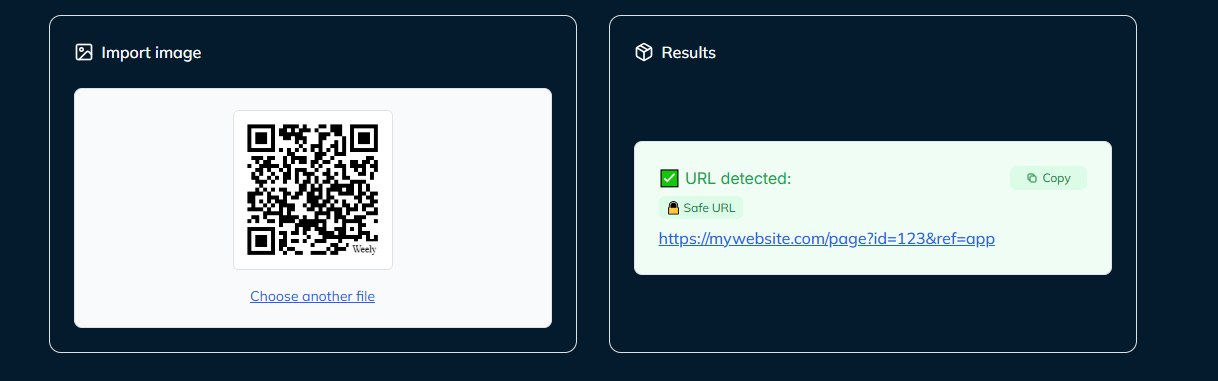
Weely offers a secure QR code scanner that produces "Safe URL" results.
Step 5: Understand the Safety Result
Weely gives you a straightforward safety judgment.
- Safe URL → You can open the link without any issues.
- Potentially Unsafe → Do Not Click. You may be facing a phishing attempt, fake website, or dangerous redirect.
Step 6: View Your Unsafe URL Result
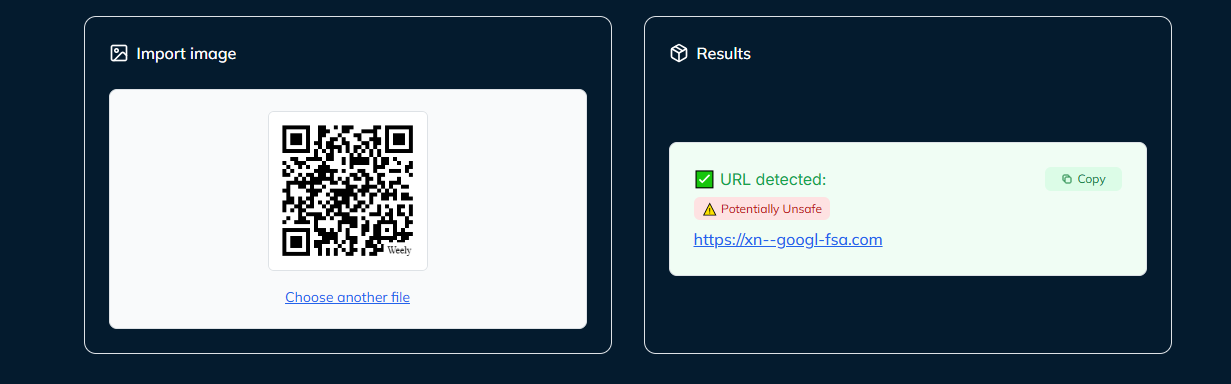
Weely detected a Potentially Unsafe link, do not click those QR code.
Step 7: Take Action Based on the Result
- If the link is Safe, you can now proceed to a safe action such as opening the link, copying the link, or bookmarking it.
- If the link says Potentially Unsafe, do not click it. Delete it or report it.
- If you would like to double-check any future QR code using Weely you can.
More QR Code Frauds to Be Aware Of
Malicious actors are coming up with ever-expanding opportunities to exploit QR codes in busy locations. Below are a few fraud tactics that you need to be aware of:
Common QR Code Fraud Types
- Fake service QR codes that are placed on parking meters or ticket machines.
- Delivery frauds where there is a QR code, saying that you missed delivery of a package.
- Coupon or reward frauds offering stunning discounts through a dangerous link.
- QR tricks to connect you to public Wi-Fi that simply redirect to a phishing page.
- Malware disguised as app updates or security applications
By being vigilant and checking any QR code with something like Weely you can avoid unsafe links and hidden risks.
Conclusion: Scan Smarter, Stay Safer Use Weely for Every QR Code
QR codes are now embedded in our daily lives, but they do come with hidden risks; malicious actors manipulate QR codes to mask dangerous links, steal your information, or redirect payments from you unwittingly. Therefore, safe scanning practices with a free QR code scanner are no longer an option; they are a necessity.
With Weely, you'll never have to guess what's behind a QR code again. Before opening any link, Weely, a safe QR code scanner shows you the real content instantly and whether or not it's a Safe URL or Potentially Unsafe URL. Weely puts your mind at ease while scanning QR codes at restaurants, retail stores, events, public spaces, or online.
Make it a habit of:
Scan → Check Safety → Decide
Weely will protect you, your device, and your information every time you scan a QR code using a free QR code scanner.
Think smart. Think safe. Scan with Weely.
Frequently Asked Questions About QR Code Safety
How do I know if a QR code is safe to scan?
You can use a QR code safety checker, like Weely, to assess the safety of a QR code. The safety checker will pull the real URL hidden inside the code and tell you if the website is a Safe URL or Potentially Unsafe, so you can avoid opening links that may be risky.
Can a QR code take me to a fake website?
Yes. QR codes are often used by malicious actors to redirect users to various phishing pages to steal passwords or personal information by impersonating a known site. You should always check the link first with a secure QR code reader or QR code scanner.
Is it safe to scan QR codes on posters, walls, or public places?
Not always. Public QR codes are relatively easy to replace with malicious QR codes. If a random QR code appears on a counter or looks to be a sticker, verify it first by checking it with an online QR code safety checker.
Can scanning a QR code install malware on my phone?
Some malicious QR codes link to harmful downloads or fake app pages. It is a good idea to scan this type of code with a QR code malware checker before proceeding to download or install anything.
What should I do if a QR code looks suspicious?
Avoid scanning the code if it appears altered, damaged, or just out of place. You should still take the time to consult a QR code safety checker (like Weely) to check the safety of the link.
Are QR codes in emails or messages safe to open?
Not every QR code sent in the email, text, or social media is safe. Some QR code links lead to phishing links often. So the rule of thumb is to always scan a code through a security and safety QR code checker before proceeding to the site.