



weely
  • logoWeely UTM Builder

Build Trackable URLs with Our Free UTM Builder

Create custom UTM tracking links in seconds and understand exactly where your website traffic comes from.

image

Built for Brands That Move Forward

fsdf
tete
trtr
trtr
trtr
erer
rerw

Create Trackable URLs Instantly

Stop guessing where your website traffic comes from. Create professional tracking URLs with custom UTM parameters in seconds.

1

Track & Measure – Smarter Campaign Insights

Identify exactly which sources bring visitors to your website. Understand how different marketing channels contribute to your traffic. Compare campaign performance and discover what works best.

test

What is a UTM Builder?

A UTM Builder is an online marketing tool that helps you create customized tracking URLs by adding UTM (Urchin Tracking Module) parameters to your website links. These parameters allow you to identify where your website visitors are coming from, which marketing channels are driving traffic, and which campaigns are generating the best results. Instead of guessing whether visitors discovered your website through Google Ads, Facebook, Instagram, email newsletters, or other promotional activities, a UTM Builder helps you track each source more accurately.

Using a UTM Builder is simple and does not require any technical knowledge. You just need to enter your original website URL and provide campaign details such as UTM Source, UTM Medium, and UTM Campaign. You can also include optional parameters like UTM Term and UTM Content to track specific keywords, advertisements, and content variations. Once you enter the required information, the tool automatically combines these details with your original URL and generates a unique tracking link that you can copy and use across your marketing campaigns.

For example, if you are running a promotional campaign on Facebook, you can create a UTM tracking URL that identifies Facebook as the traffic source, social media as the medium, and your campaign name as the campaign identifier. When someone clicks that link and visits your website, compatible analytics platforms such as Google Analytics 4 can use these parameters to categorize the incoming traffic.

How does a UTM Builder work?

A UTM Builder is an online marketing tool that helps you create customized tracking URLs by adding UTM (Urchin Tracking Module) parameters to your website links. These parameters allow you to identify where your website visitors are coming from, which marketing channels are driving traffic, and which campaigns are generating the best results. Instead of guessing whether visitors discovered your website through Google Ads, Facebook, Instagram, email newsletters, or other promotional activities, a UTM Builder helps you track each source more accurately.

Using a UTM Builder is simple and does not require any technical knowledge. You just need to enter your original website URL and provide campaign details such as UTM Source, UTM Medium, and UTM Campaign. You can also include optional parameters like UTM Term and UTM Content to track specific keywords, advertisements, and content variations. Once you enter the required information, the tool automatically combines these details with your original URL and generates a unique tracking link that you can copy and use across your marketing campaigns.

For example, if you are running a promotional campaign on Facebook, you can create a UTM tracking URL that identifies Facebook as the traffic source, social media as the medium, and your campaign name as the campaign identifier. When someone clicks that link and visits your website, compatible analytics platforms such as Google Analytics 4 can use these parameters to categorize the incoming traffic.

Is the UTM Builder free to use?

A UTM Builder is an online marketing tool that helps you create customized tracking URLs by adding UTM (Urchin Tracking Module) parameters to your website links. These parameters allow you to identify where your website visitors are coming from, which marketing channels are driving traffic, and which campaigns are generating the best results. Instead of guessing whether visitors discovered your website through Google Ads, Facebook, Instagram, email newsletters, or other promotional activities, a UTM Builder helps you track each source more accurately.

Using a UTM Builder is simple and does not require any technical knowledge. You just need to enter your original website URL and provide campaign details such as UTM Source, UTM Medium, and UTM Campaign. You can also include optional parameters like UTM Term and UTM Content to track specific keywords, advertisements, and content variations. Once you enter the required information, the tool automatically combines these details with your original URL and generates a unique tracking link that you can copy and use across your marketing campaigns.

For example, if you are running a promotional campaign on Facebook, you can create a UTM tracking URL that identifies Facebook as the traffic source, social media as the medium, and your campaign name as the campaign identifier. When someone clicks that link and visits your website, compatible analytics platforms such as Google Analytics 4 can use these parameters to categorize the incoming traffic.

Create Your UTM Links in Three Simple Steps

Discover how teams across industries use Weely.ai to connect campaigns, engage audiences, and measure marketing performance all from one platform.

Get Started Free

01

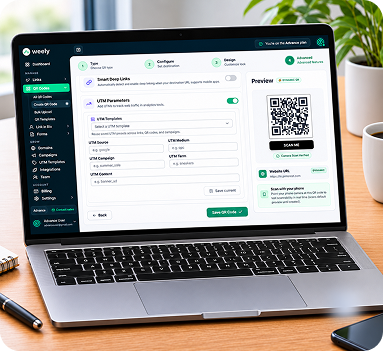
Create Your Tracked Link

Enter your URL, add UTM parameters, and preview your short link and QR code.

try

02

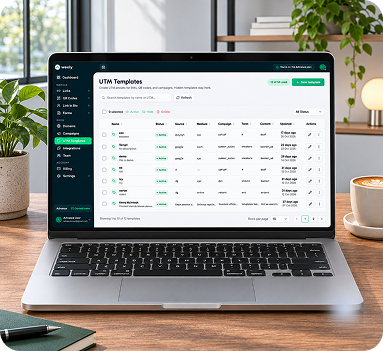
Build a Template Library

Save campaign settings once and keep every template organized in one list.

tr

03

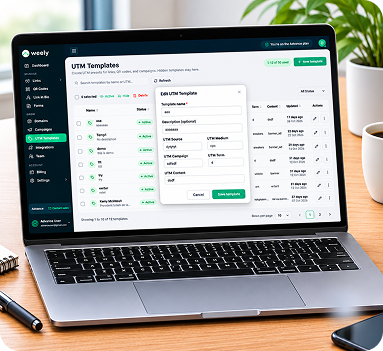
Edit and Apply in One Click

Update any template and reuse it across all your campaigns, so your tracking stays consistent.

rt
ONE CONNECTED MARKETING PLATFORM

Everything your campaign needs. Connected.

Create, share, track, and analyze your marketing campaigns, all in one platform.

REAL TEAMS, REAL EXPERIENCES.

See What Better Campaign Management Makes Possible.

Discover how customers use Weely.ai to simplify campaign workflows, connect audience touchpoints, and understand performance.

“This platform offers everything we need to manage our digital sharing in one place. Creating QR codes and organizing links is straightforward, and the overall workflow is smooth and efficient. We use it to share resources, direct customers to important pages, and support our promotional activities. It is a practical, user-friendly solution that makes our everyday work much easier.”

D

David Williams

Product Manager, NexaTech Solutions

Frequently asked questions

Lorem ipsum dolor sit amet, consectetur adipiscing elit, sed do eiusmod tempor incididunt ut labore et dolore magna aliqua.

Turn every connection into measurable engagement.

It's Fast, Easy, And Free To Get Started. Create Short URLs, Design QR Codes, And Track Your Results—All In One Platform.