Every marketer has experienced this pain. You send an email, you run an ad and you post on social media and you really don't know which click actually became a customer. You see likes, shares and impressions, but these numbers rarely tell you what happened after someone clicked. The problem with measuring digital campaigns today is that there’s too much shallow data and not enough proof of what’s working.
Impressions and followers are valuable, but they are vanity metrics that do not generate revenue. A post can go viral and get zero sales. Link tracking is now a key skill in modern marketing. It shifts your focus from "how many people saw this" to "what did people actually do."
Link tracking helps you become smarter with your marketing by showing you exactly what channel, campaign or piece of content is driving actual results. You get clear numbers on how many people clicked, where they came from, and if they converted. With a tracking link attached to every campaign, you stop guessing and start making decisions based on real data. If you want a deeper look at how link tracking fits into a broader strategy, this AI link marketing guide covers the shift from plain URLs to trackable marketing assets. In this blog, we’ll walk you through everything you need to know about link tracking for marketers, from the basics to an advanced strategy, so that you can turn every click into a clear, measurable insight.
What is Link Tracking?
Link tracking is the process of tracking who clicks your links, where they originated, and what they do after. Marketing teams don’t just post a plain web address. They create a tracking link, a special URL that stealthily collects data every time someone clicks it. That data is fed into your marketing analytics so you can see the true performance behind every campaign.
How Tracked Links Differ from Standard URLs
A typical URL moves a visitor from point A to point B. It doesn't provide you with any information about who clicked it or why. In contrast, a tracking link is constructed with additional information attached, typically UTM parameters or a unique tracking code. When someone clicks it, that information travels with them. Your link tracking tools can log the click, the source and often the outcome. This process is the basis of proper URL tracking and campaign tracking.
Common Misconceptions About Link Tracking
Many marketers feel link tracking is difficult, only for large teams with large budgets or causes pages to load slower. This isn’t the case. Using modern link tracking tools, including a URL shortening tool, you can build a custom tracking link in seconds. No coding, no noticeable wait for the visitor. Another common myth is that link tracking tracks clicks only. Good click tracking systems also track device type, location and downstream conversions in practice, giving you a complete picture rather than just a raw number.
What Happens After Someone Clicks Your Link?
Understanding the mechanics behind link tracking helps you trust the data and make it a lot easier to troubleshoot if something looks off in your reports. Here’s what actually happens, step-by-step, from the moment a person clicks your link to the moment that data appears in your dashboard.
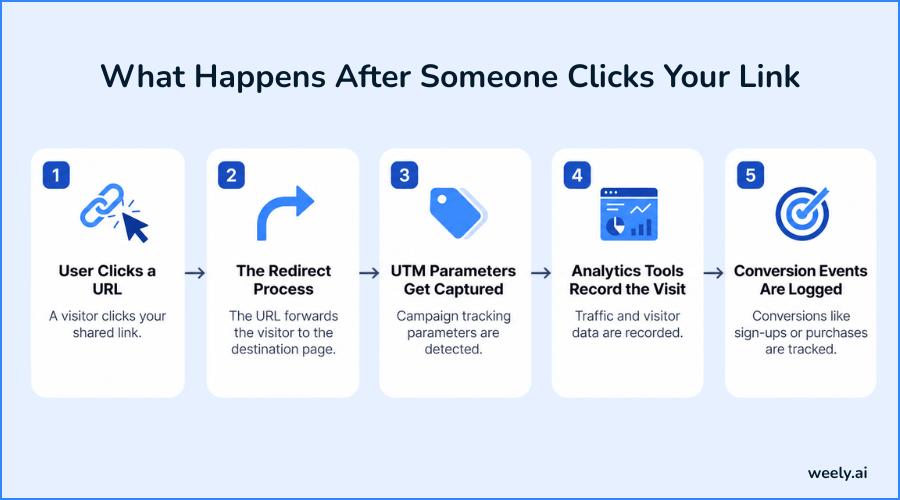
Step 1: User Clicks a URL
The process starts when someone clicks your tracking link in an email, a social post, an ad, or a QR code. The click is captured before the visitor is even where they’re going, and that’s what makes the whole system work.
Step 2: The Redirect Process
In the background, the tracking link discreetly sends the visitor to a tracking server before the actual page. This happens in milliseconds, so nobody notices any lag or delay, but it is during this brief moment that your link tracking tools grab a record of the visit.
Step 3: UTM Parameters Get Captured
If you've added any UTM parameters to the link, this is where we pull and log them. These little text snippets tell your analytics platform exactly which campaign sent the click, along with the source and medium, making campaign tracking much more accurate than just guessing based on referral data alone.
Step 4: Analytics Tools Record the Visit
Whatever analytics tool you’re using, whether it’s Weely AI, Google Analytics, or something else entirely, your analytics tool logs the visit once that click and everything associated with it is captured. This is really the tipping point where a raw click becomes something you can actually filter, segment and build reports around.
Step 5: Conversion Events Are Logged
If that visitor then goes and completes a goal, maybe buys something, signs up for a list or fills out a form, that action is attributed to that original click. This process connects click tracking and conversion tracking, which is important because it reveals who clicked and who ultimately became a customer.
The Metrics That Actually Matter
Not all data pulls its weight. Some numbers look good on a slide, but don’t tell you much about what’s actually working. The following are the metrics that really tell you how your campaign is doing and each plays a slightly different role in the overall picture of your link tracking.
- Total clicks vs. unique visitors - Total clicks show general interest, but unique visitors tell you how many separate people actually engaged, filtering out the noise from someone clicking the same link five times.
- Click-through rate (CTR) - This is the percentage of people who saw your link and clicked through. It’s a positive indicator of how compelling your messaging or creativity really is.
- Traffic source - Knowing whether clicks came from email, social or paid ads gives you the ability to compare channels side by side and move budget to whatever is actually pulling weight.
- Device, location, and browser - This info gives you an idea of your audience's habits so that you can tailor landing pages for mobile users or content based on where they come from.
- Time of click - Know when people are most active so you can time future campaigns for maximum visibility, not guess.
- Conversions and revenue attribution - Ultimately this is the metric that matters, as this is the goal of conversion tracking: to follow a click all the way through to a sale or sign-up so you know your actual return.
Collectively these metrics can transform simple click tracking into a complete view of performance, and that’s what gives your team the confidence to continue investing in what’s actually working and not just what looks appealing on paper.
Where Should You Use Tracking Links?
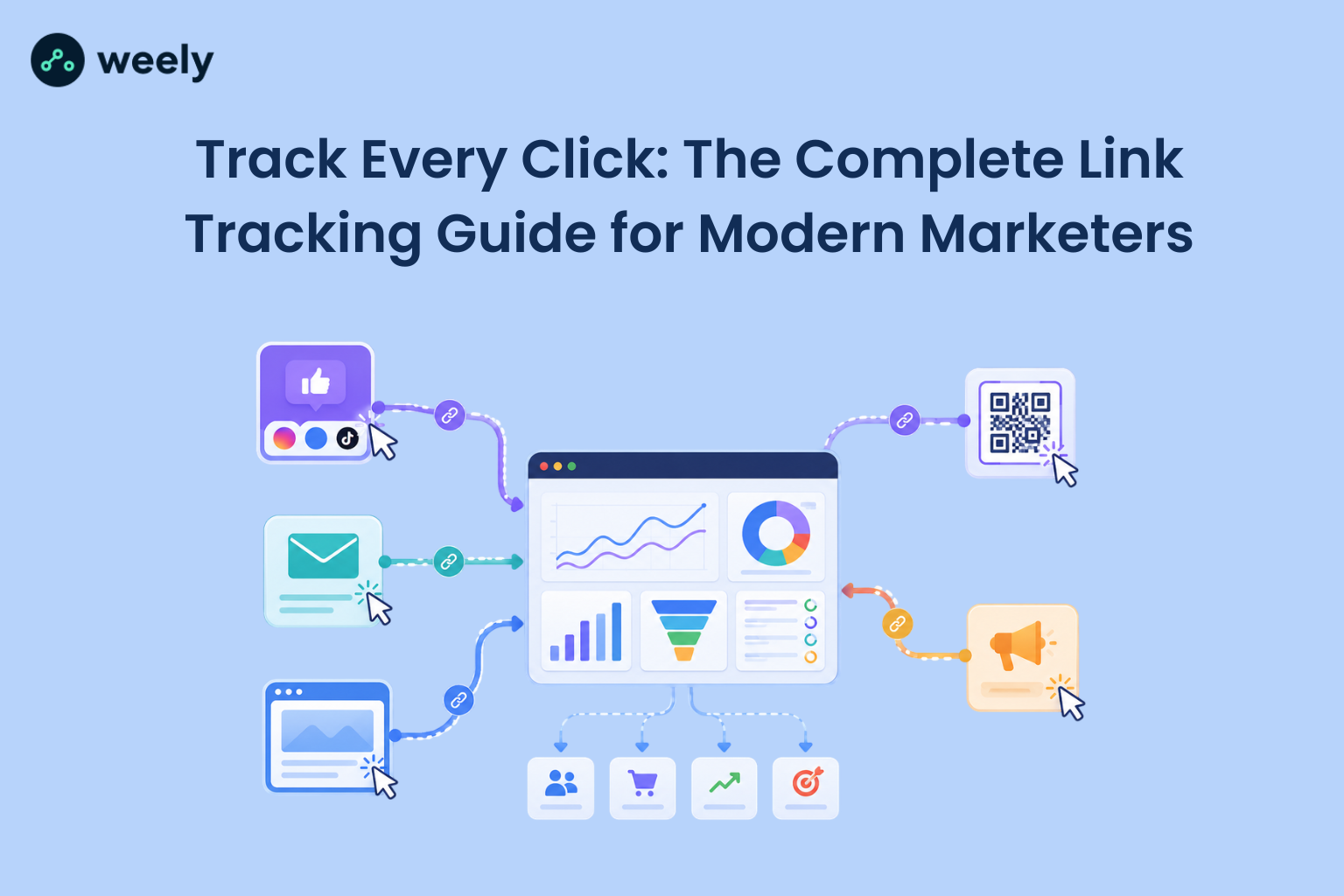
A tracking link isn’t just for one channel; it’s everywhere you share a URL. It is the consistent use of them that makes website click tracking and tracking marketing campaigns' efforts actually work across your entire marketing mix.
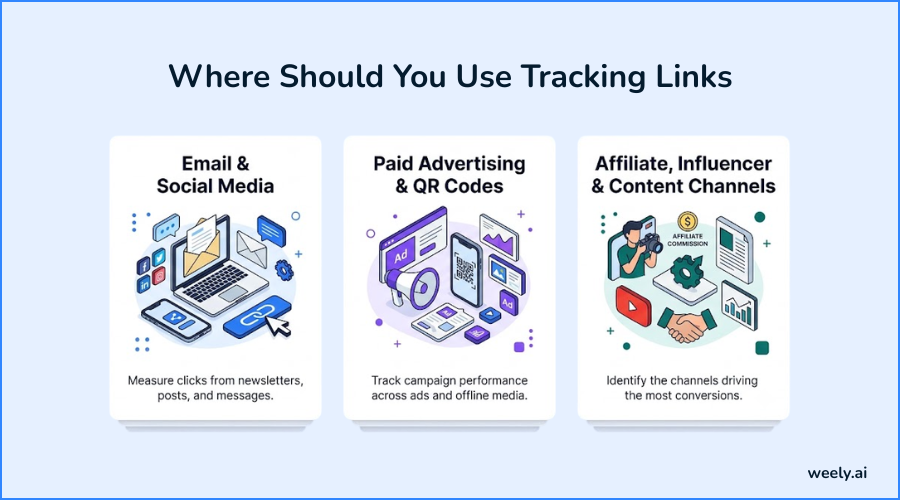
Email & Social Media
In email campaigns, a tracking link shows you exactly who clicked and helps you segment your list by engagement. By using tracking links on social media, you can compare performance between platforms such as Instagram, Facebook, and LinkedIn to see which one is driving the most valuable traffic. If you’re a creator or brand with multiple profile links, this link-in-bio marketing guide will show you how a single trackable page can turn social traffic into measurable results.
Paid Advertising & QR Codes
For paid ads, campaign tracking through tracking links makes sure that your ad spend is turning into real clicks and conversions, not just impressions. And QR codes, which are popping up everywhere from packaging to posters to print ads, have tracking links baked in, so you can measure offline campaigns just as precisely as online ones. A QR code generator allows you to easily add tracking data to a scannable code before it goes to print.
Affiliate, Influencer & Content Channels
SMS marketing, affiliate marketing, and influencer campaigns all depend on track clicks on links data to calculate payouts and measure ROI fairly. This is where a WhatsApp link generator comes in handy. It lets you turn a chat link into something you can measure like any other channel. The same applies to blog content, podcast show notes, YouTube video descriptions, and wherever you drop a link; a tracking link turns it into a measurable asset, not a shot in the dark.
Build Smarter Campaigns with UTM Parameters
UTM parameters are one of the easiest, yet most powerful tools in link tracking. They are tiny tags that are added to the end of a URL and tell analytics platforms exactly where traffic came from. UTM stands for Urchin Tracking Module. In practice it’s just a set of text codes you add to a URL (usually things like source, medium and campaign name) that allow platforms like Google Analytics to properly sort your traffic.
You’ll want to add UTM parameters to any link you share outside your website, including emails, social posts, paid ads, and partner content. If you need to know exactly where your traffic came from, UTMs are crucial because they turn a simple click into a tagged, trackable piece of data.
Naming them well is just as important as adding them. Keep your naming consistent, lowercase and descriptive with a clear structure like source/medium/campaign so your reports stay clean and easy to filter, no matter how many campaigns you run. Marketers’ common pitfalls include inconsistent capitalization, bad campaign names, and forgetting to add UTMs before launching. These little mistakes can silently break your campaign tracking and result in messy, unreliable reports further down the line.
Sample UTM URL:
https://example.com/product?utm_source=newsletter&utm_medium=email&utm_campaign=summer_sale
This single link tells your analytics platform that the traffic came from your newsletter, through email, as part of your summer sale campaign; it's all captured automatically the moment someone clicks. If you don't want to manually create these tags, a free UTM builder can create a properly formatted link in a few clicks.
How to Create a Link Tracking Strategy
Having a real link tracking strategy and not just tracking links randomly will mean your whole team has consistent, comparable data.
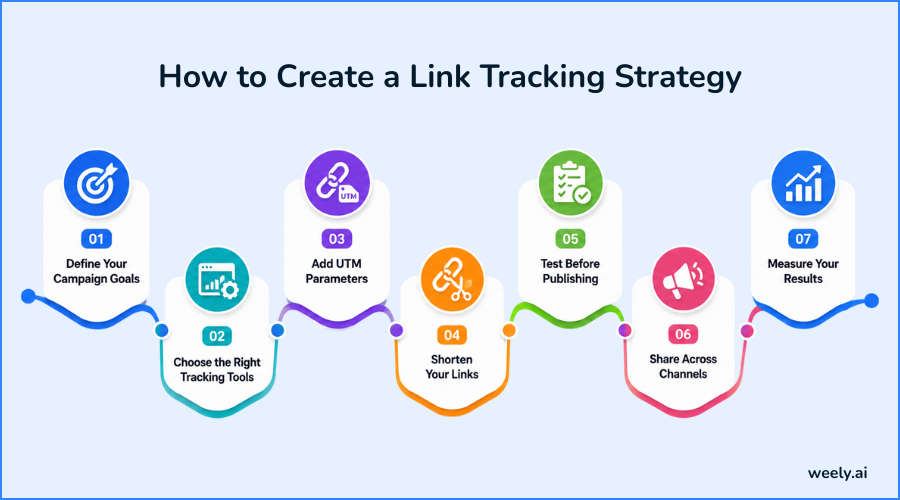
Define Your Campaign Goals
Define up front what success looks like, whether that’s clicks, sign-ups or sales, because that will dictate which metrics matter most later.
Choose the Right Tracking Tools
Choose link tracking tools that are suitable for your team size and needs, be it a simple shortener or a complete platform with built-in analytics. Most platforms will give you an idea of the basics from a Weely AI’s signup page before you pay for a plan.
Add UTM Parameters
Organize and compare your data across campaigns by using the same UTM parameters for each link.
Shorten Your Links
Long, messy URLs are difficult to manage, whereas a short and branded custom tracking link builds trust with your audience.
Test Before Publishing
Before you go live, click your own links to make sure you get redirected properly and that your UTM parameters are captured properly.
Share Across Channels
Distribute your links across email, social, ads and content to keep each channel measurable.
Measure Your Results
Don’t just look at your marketing analytics after a campaign is over. Monitor them so that you can make performance changes while there is still time to improve.
Turning Click Data into Marketing Insights
Data collection marks the first step in the overall process. The real value of link tracking is when you begin to turn those numbers into real decisions.
- Reading your reports - Don’t get bogged down in the numbers, but look for trends over time. A steady climb in clicks tells a very different story than one lucky spike that never repeats.
- Finding winning campaigns - Benchmark CTR and conversion rates across your campaigns to find out which messaging, offers or creative are really resonating with your audience.
- Identifying weak channels - If you have a channel that continues to underperform with click tracking and conversions, it’s probably time to pull back and put that budget somewhere it’ll do more good.
- Improving conversion rates - See where people are dropping off using your click data and then optimize your landing pages, calls to action or offers to close the gap.
- Budget optimization - Don’t evenly distribute your budget and hope for the best. Use your conversion tracking data to focus your spend on the channels and campaigns that work.
- Building better audiences - Click behavior and demographic data help you fine-tune who you target next, which naturally leads to more relevant campaigns over time. If you want to take your marketing efforts further, this personalized URLs guide explores how customizing a link to each visitor can take audience targeting even further.
Common Link Tracking Mistakes That Cost Marketers
These traps are even for experienced marketers and they quietly erode the accuracy of your link tracking data.
- Inconsistent UTM naming - Using “Email” in one campaign and “email” in another splits your data into separate rows, making reports harder to trust.
- Missing campaign tags - If you fail to attach tracking to even a single link, you create a blind spot in your campaign tracking, a hole in your understanding of performance.
- Using long, messy URLs - Unshortened links look unprofessional and are more likely to be ignored or mistyped by users. This guide to custom short URLs shows you how a cleaner link structure builds more trust from your audience.
- Tracking clicks but not conversions - Clicks aren’t reporting revenue and without conversion tracking you’re missing the outcome that really matters.
- Ignoring mobile performance - With the majority of clicks now coming from phones, ignoring mobile-specific data means you’re missing out on how the majority of your audience actually behaves.
- Forgetting A/B testing - If you don’t test variations of your links, subject lines or creative, you are missing opportunities to increase click-tracking results over time.
Scaling Link Tracking Across Your Marketing Team
When you’re scaling a team, link tracking needs some serious structure behind it to remain reliable. Clear, documented UTM naming conventions mean every team member tags their links the same way, no matter who’s creating the tracking link that day. Creating shared campaign templates for your most common campaign types saves everyone time while reducing naming errors across departments. It’s also important to keep simple documentation of how your tracking process works, since this means new team members can get up to speed without having to guess or reverse-engineer what everyone else has been doing.
Once you are at scale, it’s all about team collaboration and quality control, not about naming conventions and documentation. If you pick tools that let multiple users create and manage tracking links from one shared workspace, you’ll avoid duplicate or conflicting links. And if you audit your links and UTM tags regularly, you’ll catch small mistakes before they quietly throw off an entire quarter’s worth of reporting.
Choosing the Right Link Tracking Tool
There are so many link tracking tools out there that it helps to know exactly what you want before you choose one for your team.
Must-Have Features to Look For
Good link tracking tools should give you detailed analytics on clicks, sources and conversions, not just raw figures. Link shortening is critical for clean, shareable URLs and custom domains enable you to create a branded custom tracking link rather than a generic shortener. QR code generation takes your tracking into print and offline campaigns. Team collaboration features allow multiple marketers to work from the same dashboard without confusion. If your team has multiple links to manage from one place, a link-in-bio page builder can combine them into one trackable page. Teams that want to link tracking data to other marketing systems require API access, and flexible reporting allows you to view your data in the format your team actually uses.
Weely AI integrates these features into a single platform, providing AI-powered link tracking, an easy-to-use Weely AI UTM builder, real-time Weely AI click analytics, and a simple Weely AI dashboard for marketing analytics. It’s designed for marketers who want to create custom tracking links with Weely AI without juggling multiple tools, and make the entire process from link creation to reporting simple. You can check out the pricing plans page for what’s included at each tier.
Real Examples of Link Tracking in Action
Seeing link tracking applied to real scenarios makes the concept much easier to grasp.
Email, Ads & Social Campaigns
When introducing a new product through an email newsletter, you can include a tracking link in the call-to-action button to measure how many recipients clicked the link instead of only opening the email. A UTM tagged tracking link in a Google Ads campaign will confirm which ad group is driving the best traffic at the lowest cost. A LinkedIn campaign for a B2B service might add tracking links to each post to monitor engagement from both organic and paid sources, while an Instagram bio link tool uses one custom tracking link to track traffic from a creator's entire profile.
Affiliate & Product Launch Campaigns
An affiliate campaign works by giving each affiliate their own tracking link, which allows for accurate commission payouts on real, verified clicks and sales. During a product launch, a brand will use tracking links across email, social and paid channels simultaneously and then look at the data side-by-side to see which channel generated the most buzz and, more importantly, the most conversions. Free QR code generators are also often used in launches, allowing the measurement of packaging and posters in conjunction with digital channels with print materials.
Final Thoughts: Make Every Click Count
Link tracking was never really about how many people clicked on something. It’s really about knowing what people actually do and linking those clicks to real results, and that’s how you make decisions based on data, not instinct. Once you start to use a tracking link across all channels, from email to social to paid ads, you don’t have to guess anymore; you can see what is actually working.
And that kind of consistency is what translates into sharper decisions, stronger campaigns and a much clearer sense of where your marketing budget is actually paying off. It doesn't matter if you're running a single email campaign or managing a dozen channels at once; taking URL tracking and campaign tracking seriously is what turns ordinary clicks into measurable business growth.
Curious what the full picture behind every click could look like for your campaigns? Build your own custom tracking link; monitor the live performance and transform marketing analytics data into real action, all from one simple dashboard with Weely AI. You can create a free account and try it out on whatever you're running next.
Frequently Asked Questions
Is link tracking free?
Most basic link-tracking tools have free plans, but they restrict the number of tracking links you can create each month. More established platforms, Weely AI among them, usually pair that free tier with paid plans that unlock deeper marketing analytics, custom domains and features built for teams working together.
Does Google Analytics track links?
Yes, but only after you’ve appended UTM parameters to those links. You can skip this step, and Google Analytics will default to using general referral data, which gives you a much less detailed picture than a dedicated link tracking tool would.
What are UTM parameters?
They're short tags tacked onto the end of a URL that tell analytics platforms exactly where a click came from, covering the source, medium, and campaign behind it. They have become the backbone of accurate campaign tracking because almost every major analytics platform can read them.
Can I track QR code scans?
You can, as long as the QR code points to a tracking link rather than a plain URL. Each scan is logged like a normal click, making posters, packaging and event signage as measurable as anything happening online. A QR code scanner makes it easy to test the process first if you want to see it in action before committing the code to print.
What's the difference between clicks and conversions?
A click just means someone clicked on your link somewhere. When they showed up, they went further and actually accomplished a goal, such as buying something or signing up for a list. Conversion tracking is the bridge between those two moments, so you can see which clicks were worth something in the end.
Which metrics should marketers focus on?
Total clicks is a good starting point, but unique visitors, CTR, traffic source and conversion rate give a much more honest picture of how a campaign actually performed. By tracking clicks and pairing them with conversion tracking, you get the full usable view of any campaign you are running.