Understanding URI vs URL is essential for anyone navigating the web, building websites, or managing digital marketing campaigns. Many people mix these words up. Understanding this distinction can aid in enhancing websites, monitoring marketing campaigns, and ensuring accurate labeling and accessibility of online resources.
To put it another way, every URL is a URI. But not all URIs are URLs. This article will talk about what URLs and URIs are. We'll discuss their composition, give examples, show their differences, and how to use them in real life. You will also learn how to do SEO, digital marketing, and web development.
What is a URI (Uniform Resource Identifier)?
A URI is a unique name for an online resource. It might or might not show where the resource is. APIs, web development, and organizing content all need to know how to use URIs. This means that resources can be correctly linked to on all platforms.
The web is built on URIs. They also help developers and marketers find resources quickly, even if the location changes. It's important to use the best link management tools to keep track of all of these resources and keep your links organized across all of your platforms. These tools can help you speed up the process and make sure that your URIs are always treated correctly.
Definition and Meaning of URI in Simple Terms
A URI is a string that gives resources names. Some examples of resources are:
- Webpages and images
- Documents and videos
- Real-world objects (like in IoT or digital systems)
Systems can easily refer to resources with URIs. A URI is an example of an API endpoint. It tells the system which resource to use. Managing web resources would be a mess without URIs.
Components of a URI: Scheme, Authority, Path, Query, and Fragment Explained
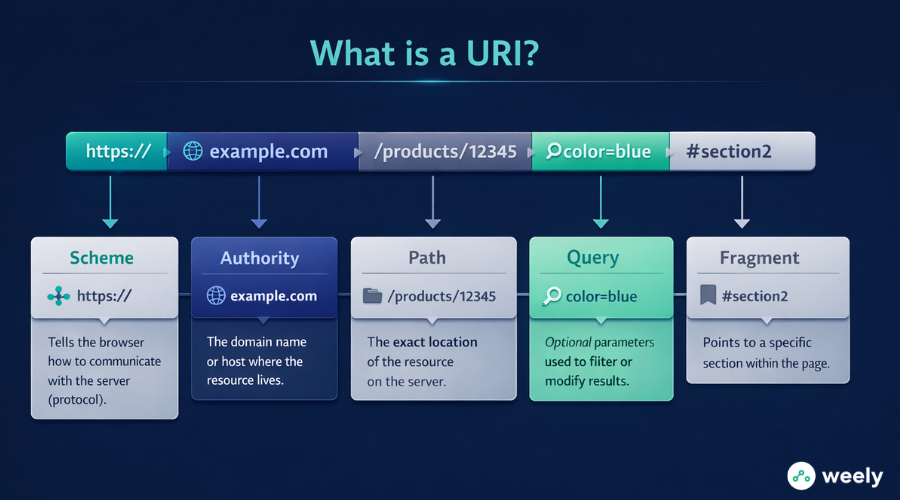
There are a few parts to a URI. These parts make it easy for people and machines to read:
- Scheme: Shows the protocol, like FTP, HTTP, or HTTPS
- Authority: Most of the time, it's the domain or host name.
- Path: Tells you where the resource is on the server
- Question: Extra information for instructions that are not required
- Fragment: points to a certain part of the resource
These parts make it clear which resource is being talked about. Because of this, they are important for SEO, web navigation, and API work.
Practical Examples of URIs You Encounter Online
- URLs: https://example.com/products/12345
- URNs (Uniform Resource Names): urn:isbn:9780134685991
- API URIs: https://api.example.com/v1/users/789
As you can see, URIs are used to define something but do not necessarily indicate the location of that resource (as in the case of a URL).
What is a URL (Uniform Resource Locator)?
A URI is a kind of URL. URLs are essential for websites, SEO, and marketing because they tell browsers exactly where a resource is. You use a URL to get to content every time you click a link.
Knowing URLs helps you make links that are easy to understand. It also lets you keep an eye on campaigns. This makes things better for the user. Using shorter URLs to make links easier to use, track, and share is a common way to use short link marketing. These short links can help get more people involved and make it easier to track how well a marketing effort is doing.
How to Understand URLs as Web Addresses and Resource Searches
A URL (Uniform Resource Locator) tells you exactly where a web resource is. A URL is different from a general URI because it lets browsers get content directly.
URLs help marketers keep track of their campaigns. It's easy to see how well things are working with short links, branded links, and UTM links.
How to Understand the Parts of a URL: Protocol, Domain, Path, and Parameters
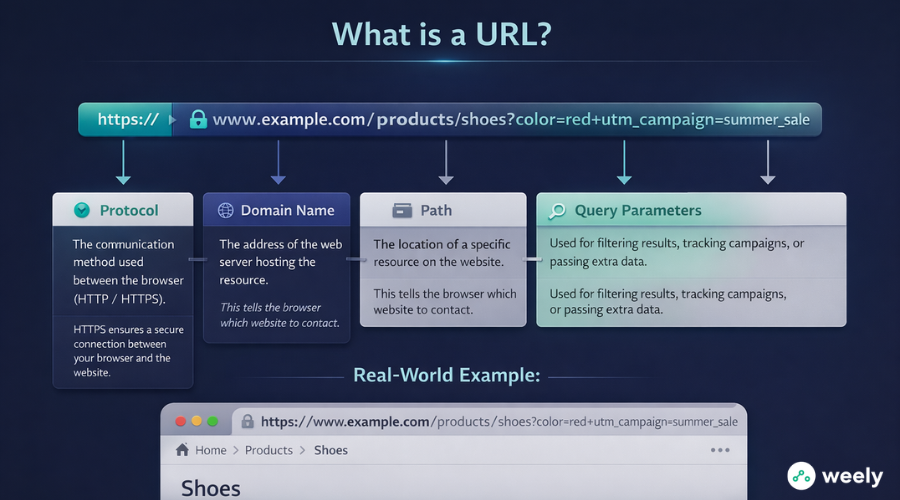
There are four main parts to a URL:
- Protocol: This tells the browser how to talk to the server (HTTP or HTTPS)
- Domain Name: The address of the server (for example, example.com)
- Path: Shows where the resource is (/products/12345)
- Parameters: More information or instructions for tracking (for example, ?utm_source=newsletter)
A URL structure that is right helps SEO. It also makes it easier to manage links. This makes the user experience better.
Real-World Examples of URLs and How Browsers Use Them
Visit https://example.com/products/12345:
- The protocol (https) makes the connection secure.
- The domain (example.com) tells you which server to use.
- The path (/products/12345) tells the browser what page to show.
Another example is https://myblog.org/articles/how-to-code.
What Are the Key Components of URI vs URL You Must Know
A URI (Uniform Resource Identifier) tells you the name, location, or both of a resource. A URI is a type of URL (Uniform Resource Locator). It also tells you how to get to that resource over the network, like HTTP or HTTPS.
Important point: All URLs are URIs, but not all URIs are URLs. For web development, SEO, and digital marketing, it's important to know this difference. When it comes to short links, TinyURLs are a popular type that belong to the URL family. They shorten long web addresses so that people can share them more easily, which is useful for marketing efforts.
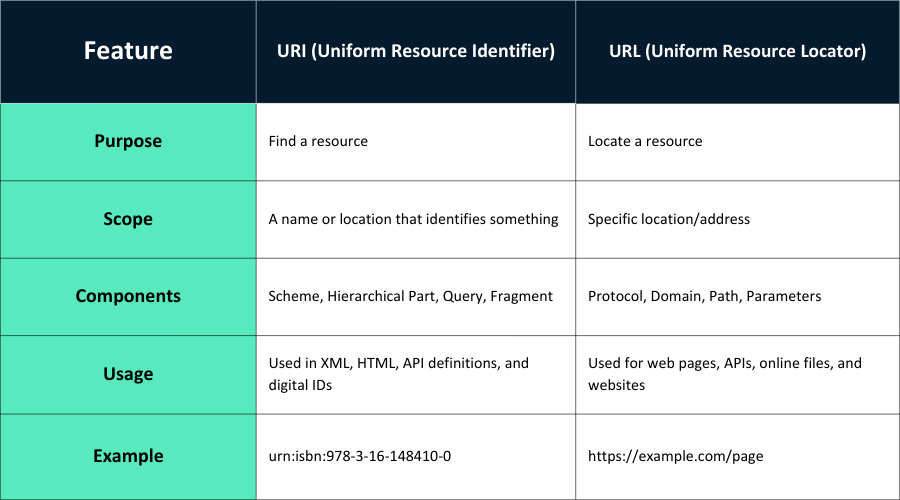
Key Differences at a Glance
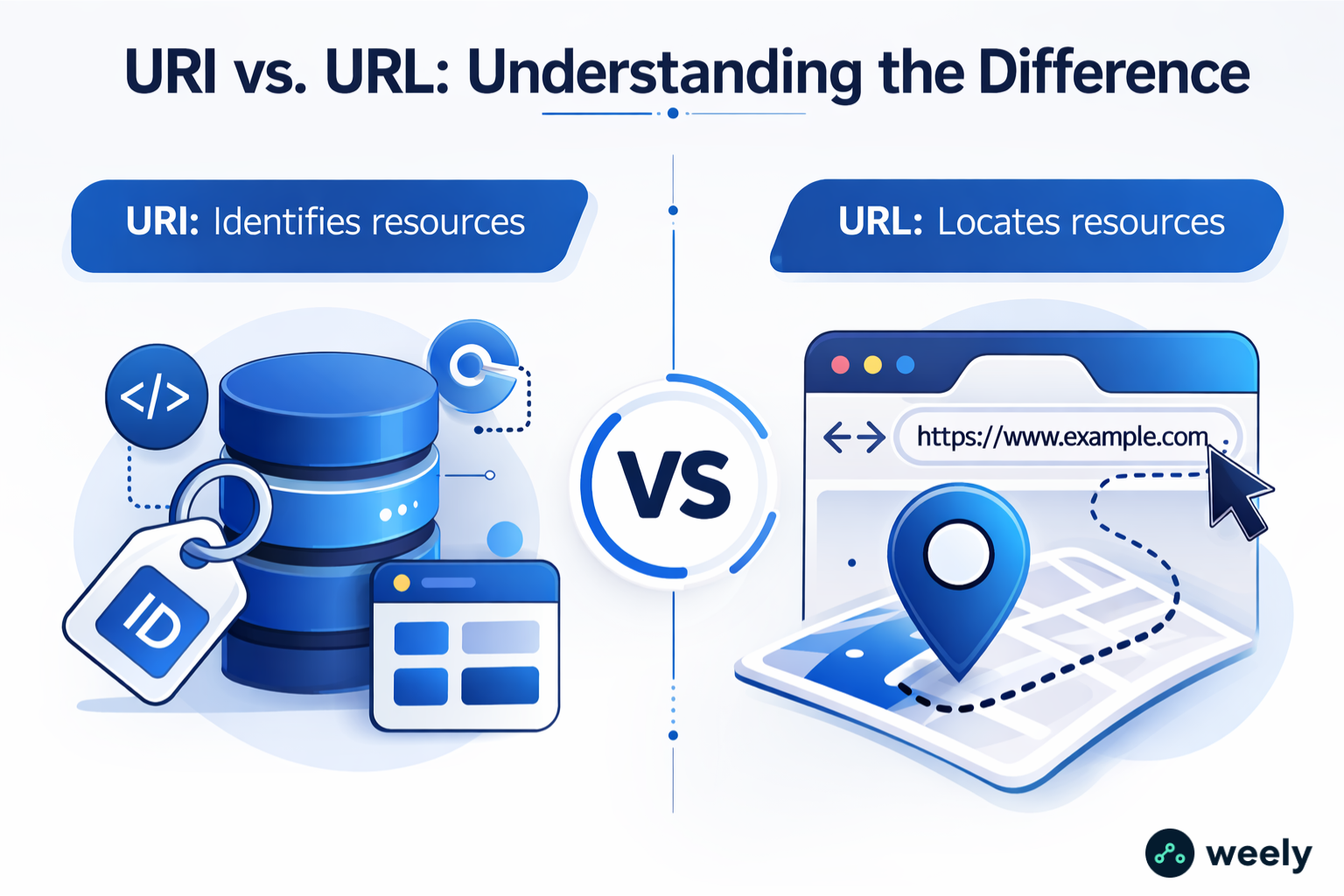
A URI tells you what a resource is, while a URL tells you where to find it.
- Scope: URLs are a subset of URIs.
- Function: URLs tell you where a resource is and how to navigate to it.
- Components: URIs can have Uniform Resource Names (URNs) in them. These are identifiers that don't change. They do not include location information (e.g., urn:isbn:978-3-16-148410-0).
- Usage: APIs, XML, HTML, and data protocols all use URIs. URLs are used to open web pages, files, and other online resources at the same time.
Why it's important to know the difference between URI and URL
- Developers and IT teams can better manage resources when they understand them well.
- It also makes sure that AI systems and search engines find and index content correctly.
- Knowing the difference makes it easier to track and analyze marketing campaigns.
- Also, it keeps web tools from getting confused about where resources are and how to find them.
- Finally, this difference helps with good API and database design.
For online vs. offline marketing statistics, it's also important to know the difference between URIs and URLs.
How to Use URIs and URLs in Practice
Developers and marketers need to know how to use URIs and URLs. If you use them right, they can help your resources be easier to find, better organized, and better for SEO.
Using URLs for Web Navigation and SEO
URLs help you find and get to things on the web. The way you structure your URLs is important whether you're making a website, a landing page, or a blog post. It's important for both SEO and the user experience.
Use clean, descriptive, and keyword-rich links to make your URLs better for SEO. Search engines will be able to figure out what your content is about better.
Make URLs shorter when you use them for email and social media campaigns. Links that are shorter get more clicks. They also make it easier for people to share your content.
Using URIs for Resource Identification
A URI tells you what a resource is, but not where it is. For instance, URIs help find endpoints and data when developing APIs. It doesn't matter where that information is stored. This feature is very important for web services and databases that use resources from more than one platform.
Practical Applications in Marketing
To keep track of campaigns, use URLs with UTM parameters. You can keep track of paid ads, social media posts, and emails.
Short links vs. Long URLs is a key consideration for marketers. Short links also make your campaigns look appealing. To remember and share, they're better.
Web developers use URIs to point to things like images, documents, and data streams. This keeps your structure consistent and able to grow.
You can get the most out of your resources by using both URIs and URLs correctly. This will help with SEO and make it easier for both people and search engines to find your content.
What Practical Examples of URI vs URL Can Help You Understand the Difference
Examples help you understand the idea better.
- URL Example: https://www.example.com/products/shoes – This link takes you to the product page on the web. It also tells you what page it is.
- URN Example: urn:isbn:978-0-596-52068-7 – Uniquely identifies a book without saying where it is.
- API URI Example: https://api.example.org/v1/users/12345 – This URI leads to a web service endpoint. It lets apps get to that data.
- Data URI Example: data:text/plain;base64,SGVsbG8sIFdvcmxkIQ== – This URI points to data directly. It doesn't depend on a place.
The following cases show how URI and URL are different. URLs let you get to a resource right away. On the other hand, URIs can name objects without telling you where they are. It's also helpful to know these changes when designing APIs, managing data, and building websites.
URI vs URL vs URN Explained: How the Three Web Resource Types Work Together
- URI: A general name for resources
- URL: Finds an online resource
- URN: Gives a resource a unique name without saying where it is.
For SEO (search engine optimization), API (application programming interface) development, and digital marketing, it's important to know all three types.

Why URLs Are Important for Websites, SEO, and Digital Marketing
The web needs URLs. They serve many purposes, like helping SEO, making the user experience better, and making marketing work better. It's very important to know how URLs work. It can make it easier for search engines to find your site. It also helps people remember your brand and makes it easier to record how well your campaign is doing.
How Vanity URLs and Branded Links Boost Trust and Click-Through Rates
Branded links and vanity URLs are important for making a strong online presence. They help businesses look more professional and stand out. These URLs are easy to spot and remember. This means that people are more likely to click on them. This makes people more likely to interact with your content, especially on social media and in email marketing.
Using Short Links and UTM Links to Track Marketing Campaigns
Short links and UTM links are very important for keeping track of marketing campaigns. Short links make it easier to share URLs on social media, in ads, and in emails. On the other hand, UTM links let marketers add tracking parameters. These help you figure out how well certain campaigns, like email newsletters or posts on social media, are doing.
How Link Management Tools Help You Keep URLs in Order
It gets harder to manage URLs as websites grow. Businesses can use link management tools to keep track of how well their URLs are doing. They also help you handle redirects more easily. These tools stop problems like links that don't work. They make sure that the experience for the user stays smooth. They also help with SEO by making sure that old URLs don't hurt a website's rankings.
Final Thoughts
Web developers, marketers, and anyone else who works with digital resources should know URI vs URL. Also, knowing how to find and identify resources makes navigation easier. It also helps with good marketing campaigns and makes SEO better.
Learning these ideas also helps businesses make the most of their links and keep track of their campaigns. It also makes it easier to understand how the web works. Optimize with short links to get more people to click on them and learn how the web works.
FAQs
What is the difference between URI and URL?
A URI (Uniform Resource Identifier) is a general term for any kind of resource identifier. A URL (Uniform Resource Locator) is a type of URI. It tells you what the resource is and how to access it via HTTP or HTTPS.
Can Every URL Be Considered a URI?
Yes, every URL is also a URI. Not all URIs are URLs, though. URLs are a type of URI. All URLs point to resources, but not all URIs tell you how to find them.
When Should I Use a URI vs. a URL on My Website or App?
Use URLs when you need to provide a location to access resources on the web, like a webpage or a file. When you only need to know what a resource is, use URIs. This is often true for APIs and databases.
How Do URIs and URLs Affect SEO and Website Optimization?
URLs affect SEO directly. Having clean SEO URLs with keyword(s) in them will help search engines find your pages. URIs do not have a direct effect on SEO; however, they are still useful for managing resources within (e.g., collections of API resources) APIs or web services.
How Can I Use Short Links and UTM URLs in Digital Marketing?
Short links and UTM URLs are beneficial for tracking marketing campaigns. Short links are easier to share and are visually more pleasing. UTM parameters assist in tracking the performance of social media ads and the source of each social media campaign, and they are an excellent way to track the effectiveness of your digital marketing campaigns.