If you're posting content every day and never checking to see what happens after someone clicks on your bio link, you're flying blind. Most creators are missing the link in bio analytics. It removes uncertainty by revealing exactly what your audience is looking for.
Most creators are obsessed with likes and followers. Those numbers are good, but they don’t pay the bills. What really grows your business is what happens after someone clicks that one link in your profile. That’s where the link in bio analytics comes in. It tells you who clicks, what they click, when they click and whether that click results in a sale, sign-up or a new follower.
The numbers alone are an argument for tracking. Today, nearly 98% of social media users are engaging with social media on mobile devices and the average link in bio click-through rate is between 1% and 3%, already outpacing the average paid social ad click-through rate (CTR) of 1.2%. Even small structural details move the needle: industry data shows the first three links on a bio page get a 130% higher click-through rate than the remaining seven. These aren't small margins. They're the difference between a bio page that quietly converts and one that's leaking traffic every single day.
In this blog, learn what a link in bio analytics is, why it matters, and the 12 link in bio metrics every creator should track to get smarter, not louder.
What Is Link in Bio Analytics?
Bio link analytics is the practice of tracking and measuring how people engage with the links on your bio page, specifically the single link that most social platforms allow you to include in your profile. It covers everything from clicks and unique visitors on the link in the bio to traffic sources, device types and conversions. Before you build out a full bio page, a reliable URL shortener is often the first piece of the tracking stack, as a lot of these links are born as a branded short link.
Link in bio analytics gives you a real link in bio data instead of guessing what content works: numbers you can act on. A simple link in the bio dashboard will typically show total clicks, click-through rate, and top links. A more advanced option is referral traffic, geographic data and revenue tracking, often as part of larger link management tools that shorten, brand and report from one place.
Why Link in Bio Analytics Matter for Creators
Link in bio analytics are important because they transform your bio page from a list of static links into a tool for making decisions. Without a link in bio insights, you don’t know why sales dropped, or a launch flopped.
Here's why tracking matters:
- Audience insight: You learn which platforms, countries, and devices your audience uses most.
- Content decisions: You see which posts actually drive clicks, not just likes.
- Revenue Attribution: You link certain links to actual sales or sign-ups.
- Faster iteration: You identify poorly performing links before they cost you weeks of lost traffic.
Mobile behavior alone makes this tracking essential. Globally, data shows that over half of the world’s web traffic is generated by mobile phones and the vast majority of internet users access the internet on a mobile phone at least some of the time. If your bio link page isn’t built and tracked with mobile behavior in mind, you’re probably missing out on clicks you’ll never even know about. It’s one of the reasons more creators are flocking to an AI-powered link in bio tool that layers analytics on top of the page itself, rather than guessing from platform-level data alone.
12 Link in Bio Metrics Every Creator Should Track
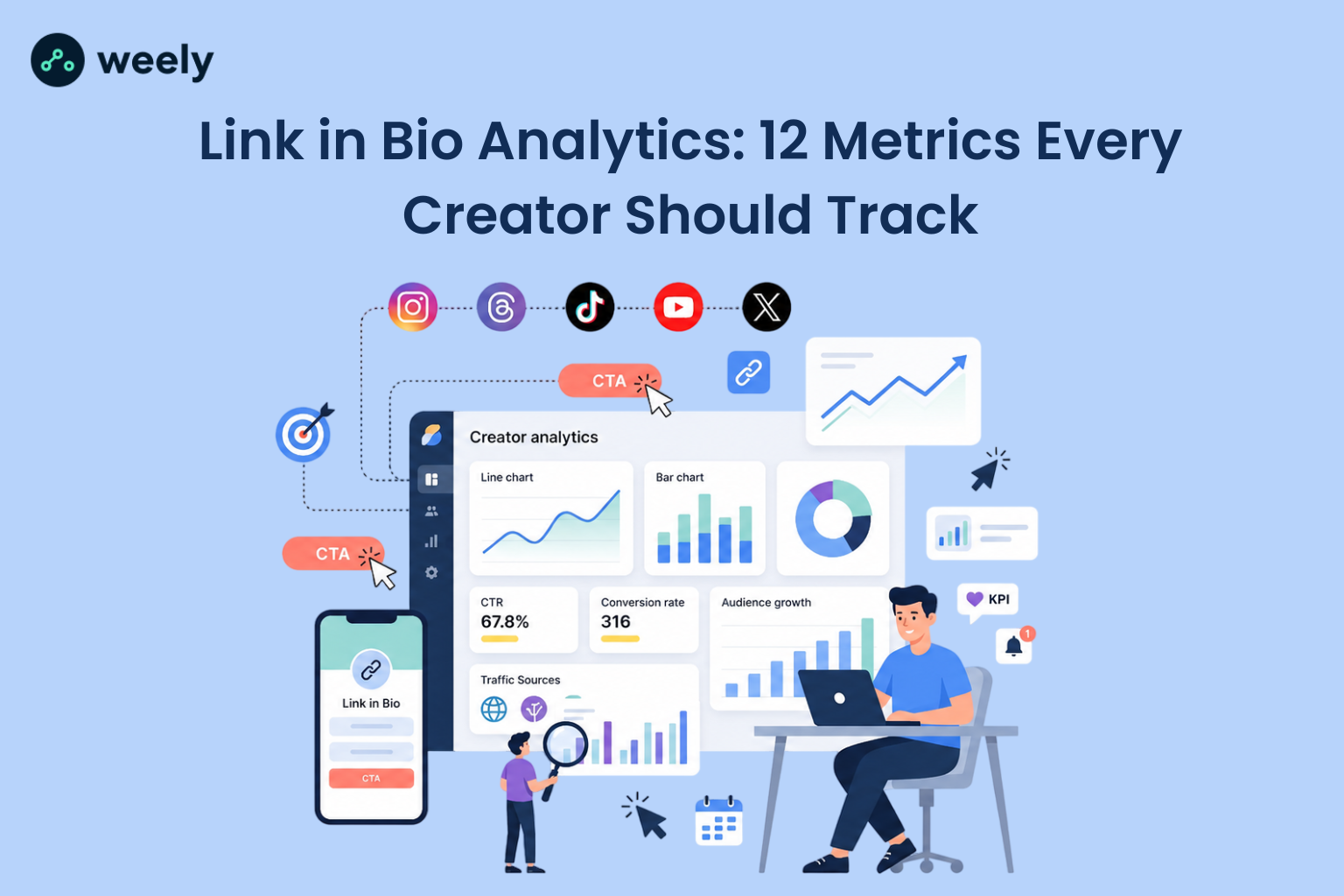
These are the core links in bio metrics that transform basic tracking into a comprehensive strategy. Together, you get a full-funnel view of your bio link performance.
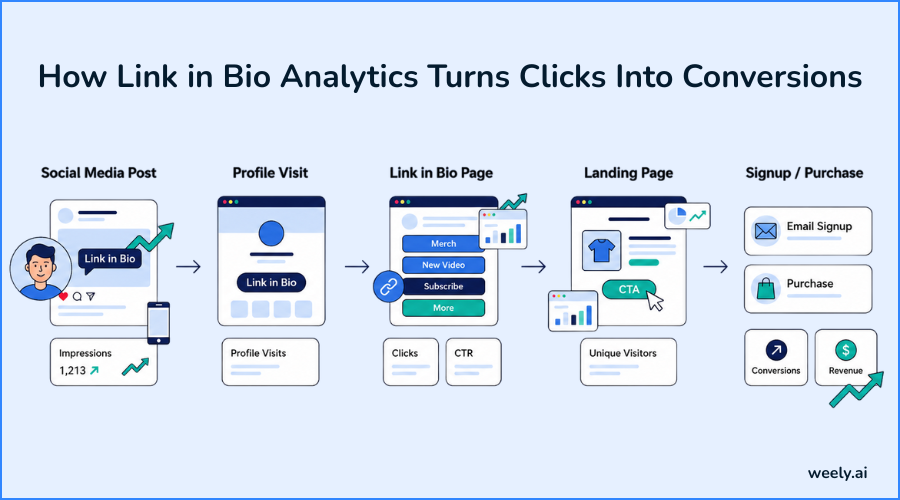
1. Click-Through Rate (CTR)
Your link-in-bio click-through rate is the percentage of people who view your bio page, and then click a link. It’s calculated as clicks divided by profile visits (or impressions) times 100.
Industry data indicates that a typical link-in-bio CTR benchmark range is between 1% and 3%. To put it in context, the average paid social ad CTR is only around 1.2%, so a well-optimized bio page can actually beat paid ads. Link order matters too; one analysis found the first three links on a bio page receive a 130% higher CTR than the remaining seven, which is a good case for putting your best offer at the top.
2. Total Clicks vs. Unique Visitors
Total clicks count every click, including multiple clicks from one person. Unique visitors count each person one time. Tracking both helps you tell the difference between a small group clicking over and over and legitimate, wide reach. If your number of unique visitors linking in bio is growing but total clicks are flat, you’re gaining an audience but not yet deep engagement.
3. Top Performing Links
This metric ranks all links on your page by clicks. Your top-performing links analytics tell you exactly what your audience wants: a product page, a YouTube video, an email sign-up form, or an affiliate deal. An affiliate deal. Review weekly and push your strongest links higher on the page, as position alone can move click volume massively.
4. Traffic Source Breakdown
The traffic source breakdown in the report shows what platform sent which visitor: Instagram, TikTok, YouTube, X, or direct search. This is important because behaviour varies widely across platforms. Referral traffic links in bio data from a link-heavy platform like Pinterest tend to convert differently than fast-scroll platforms like TikTok, where users move through content in roughly a second or two before deciding whether to engage further. This breakdown is far more accurate if you’ve tagged your links with a UTM link tracking guide, as it separates out organic clicks from paid or cross-posted traffic.
5. Conversion Rate
Link-in-bio conversion rate tracking is a way to measure how many clicks lead to a completed action, like a purchase, booking, or form submission. This is not the same as CTR, which only measures if someone clicked. A high conversion rate means your offer, pricing and page post-click are doing their job.
Device counts here as well. Broader e-commerce data shows desktop conversion rates averaging 3.5% to 4.0%, compared to roughly 1.8% to 2.5% on mobile. That’s a major reason to keep your linked pages fast and easy on small screens; most of the bio link traffic is mobile. That’s where a well-structured link-in-bio page builder comes into play, as mobile-first templates tend to convert better than desktop-first pages.
6. Bounce Rate
The link-in-bio bounce rate indicates how many visitors leave your page without clicking anything at all. A high bounce rate usually means a confusing layout, too many links, or unclear labels. If people come and go immediately, the answer is almost always simplification: fewer links, clearer titles, and a stronger top offer.
7. Device Breakdown (Mobile vs. Desktop)
The bio report has a device breakdown link that breaks traffic down into mobile, desktop and tablet. This one number can change your whole design strategy. Data from social platforms shows mobile dominance is almost universal. Around 98% of social media users access their platforms via mobile devices, and that figure is even higher for some individual apps. If your bio page isn’t optimized for a small screen, you’re probably losing many clicks before your visitors even see your offer.
8. Geographic Data
Bio-tracking geographic data links show where your clicks are coming from, by country or city. This is handy for scheduling content drops, running region-specific promotions, or determining what currency and shipping options to promote. If most of your audience is concentrated in a few regions, you can tailor offers instead of assuming a one-size-fits-all approach.
Geographic data is also important beyond digital channels. If you’re printing flyers, packaging or event materials, a free QR code generator lets you connect offline audiences to the same bio link analytics you’re already tracking online. That’s why many small businesses use QR codes for business cards, menus and posters. A built-in QR code scanner makes it easy to test how your codes behave before printing them at scale. Add to that a more comprehensive QR code marketing strategy and Weely's dedicated QR codes product, and you've got one holistic view of where clicks are coming from, regardless of whether they were initiated online or offline.
9. Peak Traffic Times
Peak traffic times link in bio data show exactly when your audience is most active on your page. Timing is everything: If you offer something at the right time, such as just before a traffic peak, you can really increase the number of eyes that see it. Most creators post based on habit rather than data; this metric replaces habit with evidence.
10. Follower Growth Attribution
Follower growth from bio link tracking connects specific links (e.g. a “Follow me” button or cross-platform link) to actual new followers gained. This indicates whether your bio page is effectively helping you grow your audience across platforms, rather than merely monetising your existing audience.
11. Revenue/Sales Attribution
The revenue attribution link in your bio tracking counts clicks and tracks dollar amounts associated with specific links. Here’s the metric that turns your bio page from a vague marketing tool into a trackable sales channel. If you combine your bio link platform with UTM tracking or an integrated analytics tool, you can determine which link, post, and service actually drove revenue.
12. Link Engagement Over Time (Trends)
Link in bio performance trends show how clicks on a link increase or decrease over days, weeks or months. One day's worth of data can fool you. A trend line tells the real story. Watching trends lets you see fatigue on an older offer or catch early momentum on a new one before it peaks.
How to Improve Your Link in Bio Performance Using Analytics
Tracking 12 metrics isn't much use if you never do anything with what they tell you. Once you have the data in front of you, the real work begins: figuring out which leak to fix first.
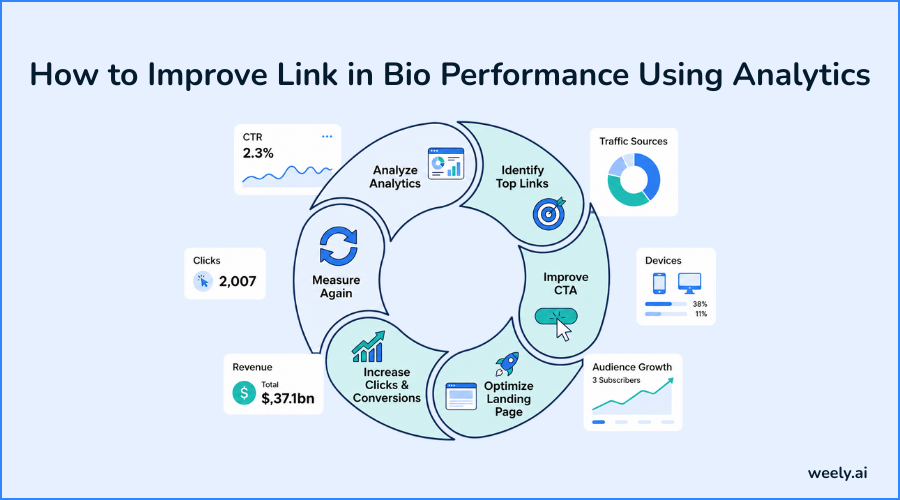
A low CTR typically means one of two things. Your top links aren’t compelling enough, or your layout is burying the offer that matters. Try replacing your best link with the top slot and see what happens over the next week or two. That one change often moves the needle more than people expect. Is the bounce rate telling another story? Mostly it's a clutter issue. There are too many links, the labels are unclear, and there is no obvious “start here” moment. Cut it down. And if conversions are fine on desktop but tank on mobile, stop guessing and open your page on a phone. Slow load times and tight buttons kill more sales than inadequate copy ever could.
Getting more clicks isn’t a one-time fix. It’s a loop: alter something, check the numbers for a week, keep what works and drop what doesn't. Do that and keep doing it and the small wins start to add up to something that actually shows up in your revenue.
What's a Good Click-Through Rate for a Link in Bio Page?
Most bio pages are between 1% and 3% and that’s a reasonable benchmark if you are just starting out. However, raw percentages provide only a partial view of the situation. A narrow but highly engaged audience with real intent to buy can reach 8-10% on a single, well-placed offer, whereas a large, less engaged one might be less than 1% in spite of a very high click volume on paper.
The number is less important than the context around it. A small fitness or education account, where every single follower actually wants what you’re selling, will generally beat a massive entertainment page, click for click, purchase for purchase, even with a fraction of the audience size.
Best Tools for Link in Bio Analytics
Here are some of the core features to look for as you search for the best link in bio analytics tool for your needs:
- Real-time data so you can react to spikes or drops as they happen
- Track real conversions with built-in analytics; not just clicks
- Traffic source and device breakdowns without needing a separate analytics platform
- Clean, exportable link in bio dashboard views for reporting
A link in bio tool that has built-in analytics saves you from piecing together a bunch of different platforms to answer basic questions about your audience. This is exactly where an AI-powered link in bio method comes in: automating the pattern recognition that took hours of manual review. It’s also good to learn how to optimize campaigns with branded short links because the same tracking principles apply whether the click is coming from your bio page or a shared link somewhere else.
Cost matters too. Before you sign up, compare the flexible pricing plans across a few tools, because the depth of analytics can vary much more between free and paid tiers than the marketing copy might suggest.
Track Smarter with Weely AI
Weely AI was built around a simple idea: creators shouldn’t need a data science degree to understand their audience. Weely AI link in bio analytics automatically track all 12 metrics above, from click-through rate to revenue attribution and surface the ones that need your attention first. If you want the bigger picture of why this is happening, how AI is transforming link-in-bio pages covers the bigger trend behind smarter, self-optimizing bio pages.
You can build a fully customizable link-in-bio page and connect it to the same analytics engine discussed throughout this guide, so all of the above metrics live in one dashboard, not several separate tools.
A few features worth mentioning:
- Weely AI dashboard: One clean view of clicks, conversions, traffic sources and device breakdowns; no spreadsheets needed.
- Analytics & AI bio link builder: Use your click data to get recommendations on link order and page layout, not generic best practices.
- Track bio-link performance with Weely AI: Real-time alerts flag sudden traffic spikes or drops so you can act immediately.
If you’re a creator with affiliate links, a coach with a program to sell, or a small business running product drops, Weely AI creator tools give you the same link in bio insights as a full analytics stack. You can start your free Weely AI account in a couple of minutes and connect your first link the same day.
Conclusion
Link in bio analytics transforms your bio page from a list of links into a growth engine you can actually measure. By tracking these 12 metrics, from click-through rate and conversion rate to geographic data and revenue attribution, you get the link in bio data you need to make faster, smarter decisions instead of guessing.
The most prolific creators aren’t necessarily the most rapidly growing. They’re the ones who track links in bio performance closely and adjust based on what the numbers actually mean. Start with a few key metrics, get in the habit of reviewing them regularly, and let the Weely AI creator tools do the heavy lifting so you can focus on creating. Ready to put these tools to work? Set up your link in the bio page and track these 12 metrics from day one.
Frequently Asked Questions
What metrics should I track for my link in bio page?
Track click-through rate, unique visitors, top-performing links, traffic sources and conversion rate at minimum. These five metrics provide you a quick take on reach and revenue. The full list of 12 links in bio metrics above gives more context around device, geography, timing, and follower growth.
How often should I check my link in bio analytics?
Review the top-line link in bio metrics weekly; do a deeper dive monthly. If you monitor every day, you'll tend to overreact to normal fluctuations. If you check too infrequently, you'll miss problems, like a broken link or a sudden drop in traffic, for too long.
What's the difference between clicks and conversions on a link in bio page?
A click means someone clicked a link on your bio page. A conversion happens when that click results in a completed action, such as a purchase or sign-up. High clicks with low conversions usually indicate a problem on the page after the click, not on the bio page itself.
How can I track which social platform sends the most traffic to my bio link?
Use a traffic source breakdown link in a bio report, available in most link in bio dashboards or add UTM parameters to your links and check the source data in a connected analytics tool. This shows how much traffic is coming from Instagram, TikTok, YouTube or other platforms.
Do Links in Bio Tools Show Real-Time Analytics?
Weely AI included, most of the better tools do. Real-time data is most valuable in the moments you can’t afford to miss: a post that’s suddenly taking off, a launch day, a spike you need to catch before it fades. If you check your numbers in the morning, you've missed the window of opportunity. If you want to see what that looks like with your own links, sign up free and watch the clicks come in as they happen before you commit to anything paid.