One of the easiest ways to get in touch with customers right away is with a WhatsApp QR code. Users don't have to save a number or type a message; they can just scan a code and start talking.
This blog will show you how to generate WhatsApp QR code, scan it, and use it to grow your business. This blog also talks about QR codes for WhatsApp Web, tools, and best practices.
What is a WhatsApp QR code?
A WhatsApp QR code is a code that can be scanned to open a WhatsApp chat. It can have your phone number and even a message that is already filled out.
It sends people to your WhatsApp QR code link or chat window when they scan the code.
You can use it like a WhatsApp QR code contact.
- A WhatsApp QR code contact
- Marketing tool
- A support entry point
A WhatsApp QR code can be created as a static or dynamic QR code, depending on how you want to use and manage it. Dynamic QR codes offer more flexibility, allowing you to update the link or message without changing the code itself.
Benefits of Using a WhatsApp QR Code
There are many benefits to using a WhatsApp QR code for business:
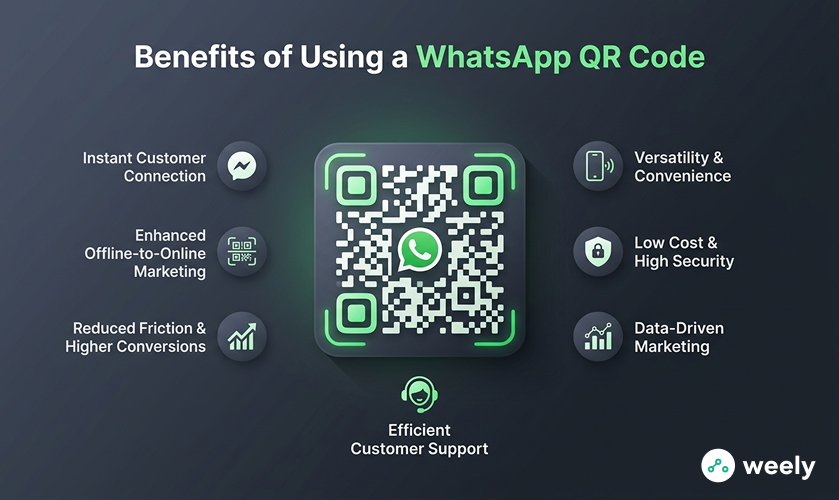
Instant Customer Connection
People can easily get in touch with your business by scanning a WhatsApp QR code. They can scan a WhatsApp QR code for marketing or a WhatsApp QR code for customer support. This approach gets rid of delays and makes communication easy. Because of these features, customers can get to you faster.
Enhanced Offline-to-Online Marketing
A WhatsApp QR code connects offline advertising with online interaction. You can put it on flyers, banners, or the packaging of your products. This will make your QR code marketing campaigns work better. You can easily use QR codes on flyers, packaging, and print materials to connect offline audiences to WhatsApp.
Reduced Friction & Higher Conversions
WhatsApp QR codes make it easier for customers to get around. They cut down on steps and make it more likely that people will convert by making it easy to get to. Customers find it easier to engage with your WhatsApp QR code for marketing.
Efficient Customer Support
Using a WhatsApp QR code for customer support gives you a quick and direct way to talk to someone. So, response times get better and customers are more likely to interact with the company.
Versatility & Convenience
You can use WhatsApp QR codes on many different platforms. You can put them on flyers, banners, product packaging, or digital media. Such versatility means they can change a lot.
Data-Driven Marketing
A QR code for WhatsApp helps you record how many people are interested. You can make your QR code marketing and customer engagement strategies better by looking at how people interact with them.
Low Cost & High Security
WhatsApp QR codes are cost-effective. They also make sure that businesses and customers can talk to each other safely. A WhatsApp QR code for customer support makes interactions safe and reliable. It’s also important to understand QR code security for businesses to ensure safe and trusted interactions.
How to Generate a WhatsApp QR Code (Step-by-Step Guide)
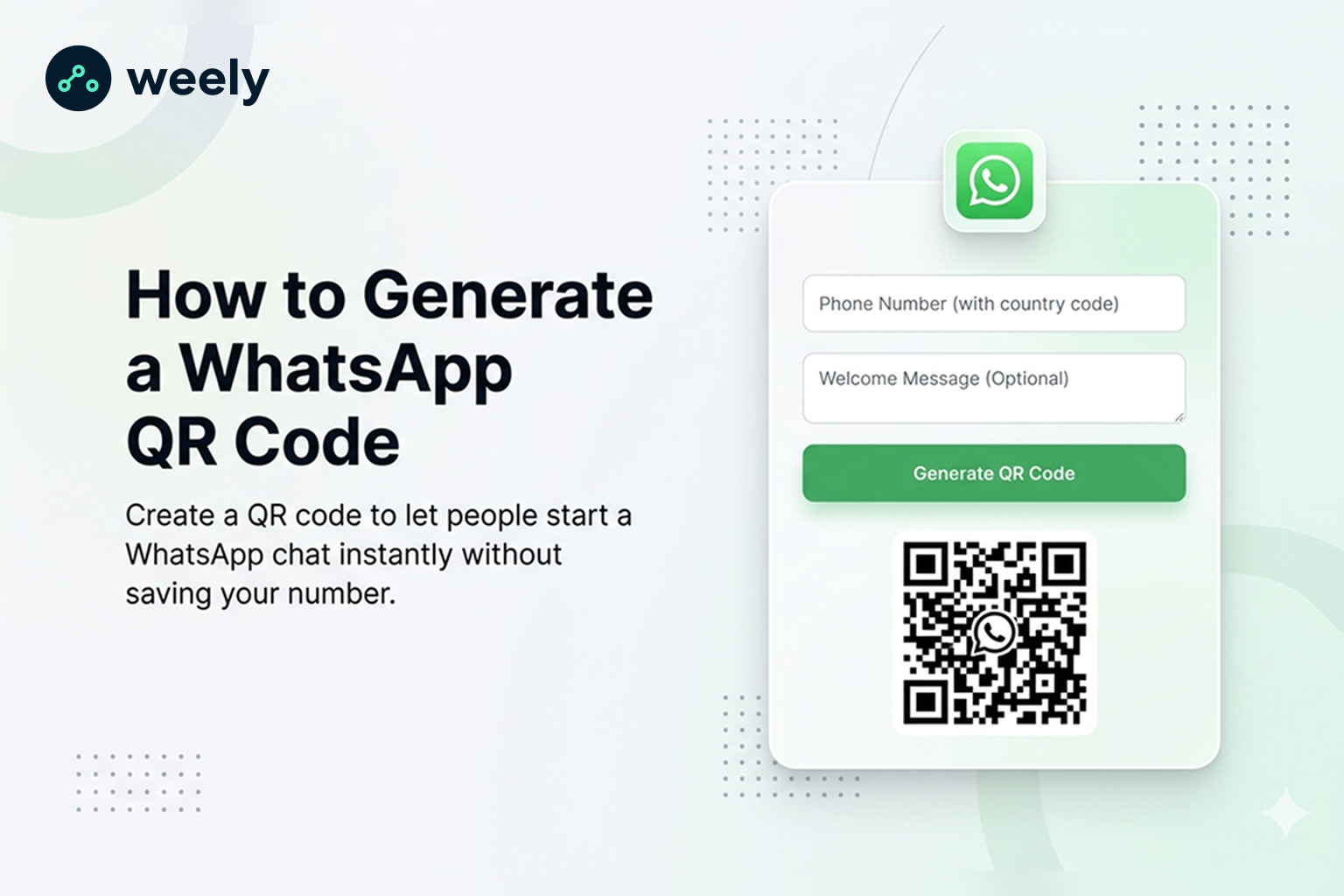
It's simple and quick to make a WhatsApp QR code for your website. Also, do these things to make your own code. You will use the QR code generator for WhatsApp.
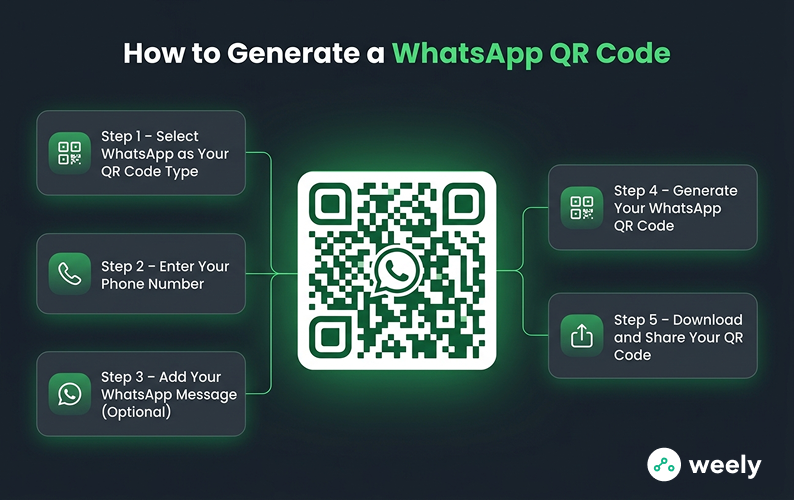
Step 1: Select WhatsApp as Your QR Code Type
From the list of "Select QR Code Type," pick WhatsApp. This way, your QR code will only work for WhatsApp.
Step 2: Enter Your Phone Number
Enter your WhatsApp phone number along with the country code. By doing so, you create a valid WhatsApp QR code contact. People can talk to you directly.
Step 3: Add Your WhatsApp Message (Optional)
Type the message that people will send when they scan your code in the message box. This step generates a WhatsApp QR code with a pre-prepared message for sending. It makes conversations more engaging. It also saves everyone time.
Step 4: Generate Your WhatsApp QR Code
The site makes a QR code preview after you fill out your information. Thereafter, you can review it. This step makes sure that everything looks right before you download it.
Step 5: Download and Share Your QR Code
Here is where you can save your WhatsApp QR code: Click the Download QR button. So, you can put it on social media, marketing tools, or packages. The customer is more interested after this simple step.
If you want flexibility, you can also update your QR code later without reprinting, which is useful for changing phone numbers or messages.
How to Scan a WhatsApp QR Code
It's simple and quick to learn how to scan a WhatsApp QR code. Do these things first:
- Open WhatsApp on your phone.
- Tap the QR code icon and select Scan Code.
- Point your camera at the QR code.
- The chat opens instantly.
You can also scan a photo of a WhatsApp QR code saved on your phone. Also, this method works for screenshots and pictures, and it's helpful for:
- Sharing contacts quickly
- Connecting with businesses
- Joining group chats
You can start conversations on WhatsApp without having to type in phone numbers by using the scan QR code option. A WhatsApp scan code also speeds up communication, whether it's with a business or personal contact.
In general, knowing how to scan a WhatsApp QR code saves time and makes it easier to connect. To scan a code, open WhatsApp, tap Scan Code, and then point your camera at it or use a WhatsApp QR code photo. It's that simple.
Using WhatsApp QR Codes for Marketing & Business
QR codes are more than just a way to send messages; they are a powerful marketing tool. Companies can use them to get people more involved and make it easier to talk to each other. A successful WhatsApp QR code marketing plan can have a big effect.
- Lead Generation: Put QR codes in ads, brochures, or posts on social media. This helps you quickly get in touch with potential customers. Also, when you add a call to action to the QR codes, it makes people want to start a conversation right away.
- Customer Support: Use a WhatsApp QR code for customer support so that customers can message your support team right away. This way, you can serve customers faster, make them happier, and respond more quickly.
- Website Integration: Add a QR code for WhatsApp to your website so that it works with it. Then, people can get in touch with you right from the page. This gets people more involved and leads to more sales.
Using WhatsApp QR codes in your ads makes it easy for people to get to your business. Also, it makes things easier for both marketing and customer service. A good WhatsApp QR code marketing plan not only saves time, but it also builds stronger relationships with customers. Businesses already using QR codes for small business marketing are seeing better engagement and faster customer interactions.
In short, QR codes are a useful and easy-to-use tool. Using WhatsApp QR codes the right way can change how you talk to customers, whether you want to get leads, give them instant help, or connect them to your website.
Conclusion
A QR code for WhatsApp is a powerful and simple-to-use tool. In fact, it makes it easy for people to get in touch with you right away. It's quick and easy to generate WhatsApp QR code, use it for marketing, or manage chats through the WhatsApp web QR code. It also saves time and makes communication easier.
So, to improve communication, get more people involved, and grow your business, start using a QR code WhatsApp strategy today.
FAQs
What is a WhatsApp QR code?
A WhatsApp QR code is a code that people can scan to start a chat with you right away without having to save your number. It's also useful for both personal and business use, and you can share it online or print it out.
How to generate WhatsApp QR code for free?
Get a free online WhatsApp QR code maker. First, type in your phone number. If you wish, you can modify the phone number before generating the code. You can then download it or share it on social media, email, or print it out.
How to scan a WhatsApp QR code?
To scan a QR code, open WhatsApp, tap the scan option, and point your camera at the code. You can also upload a picture of a QR code that you have already saved. The chat opens right away after you scan it, so you can start messaging right away.
Can I create a WhatsApp QR code with a message?
Yes, you can pre-fill a message when creating the code. This is useful for businesses, invitations, or promotions, for example, because it lets people send messages quickly.